Building Subscription-Based Mobile Apps: Architecture Guide
Subscription revenue is the dominant business model for mobile apps in 2022. From fitness and meditation apps to productivity tools and content platforms, recurring revenue provides predictable income and higher lifetime customer value than one-time purchases.
But building a reliable subscription system is significantly more complex than adding a “buy” button. You need to handle purchase flows, receipt validation, subscription lifecycle events, grace periods, platform differences, and edge cases that only appear at scale. This guide covers the architecture required to get it right.
Subscription Architecture Overview
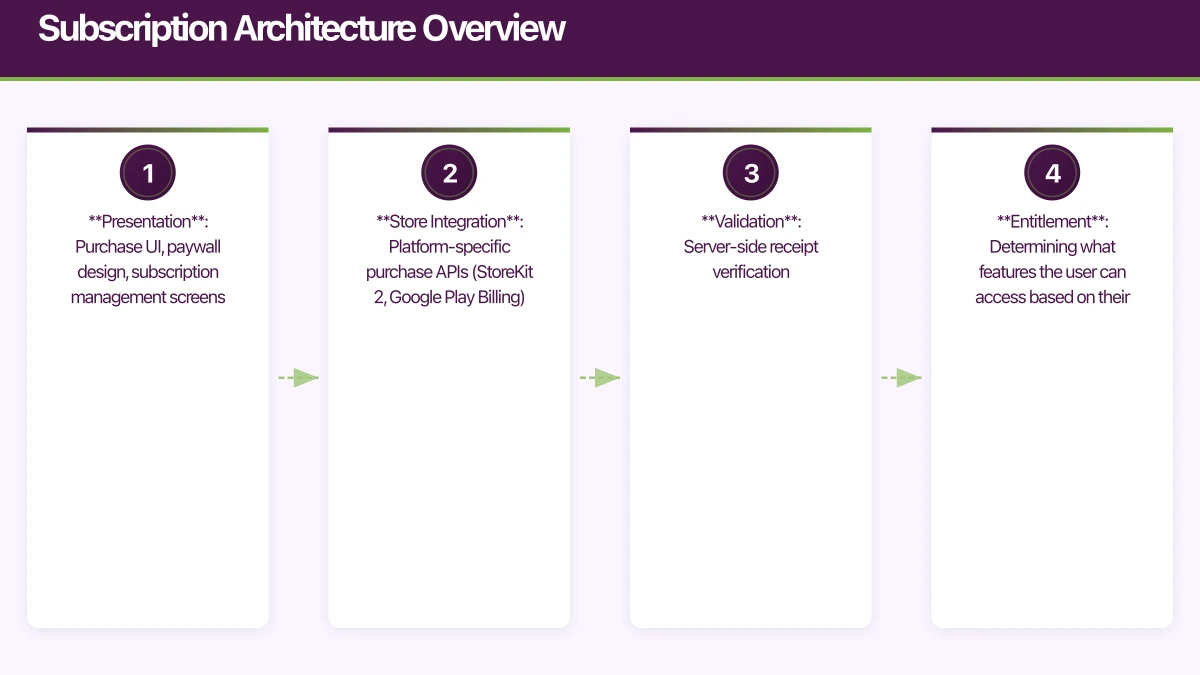
A robust subscription system has four layers:
- Presentation: Purchase UI, paywall design, subscription management screens
- Store Integration: Platform-specific purchase APIs (StoreKit 2, Google Play Billing)
- Validation: Server-side receipt verification
- Entitlement: Determining what features the user can access based on their subscription state
The Critical Rule
Never trust the client. Always validate purchases server-side. A user with a jailbroken device or a modified APK can fake client-side purchase confirmations. Your server must independently verify every transaction with Apple or Google.
iOS
 : StoreKit 2
StoreKit 2, introduced in iOS 15, dramatically simplifies subscription management compared to the original StoreKit. It uses modern Swift concurrency and provides a cleaner API.
Product Configuration
Define your subscription products in App Store Connect, then load them in your app:
import StoreKit

class SubscriptionManager: ObservableObject {
    @Published var products: [Product] = []
    @Published var purchasedSubscriptions: [Product] = []
    @Published var subscriptionStatus: SubscriptionStatus = .none

    private let productIds = [
        "com.example.app.monthly",
        "com.example.app.annual",
    ]

    func loadProducts() async {
        do {
            products = try await Product.products(for: productIds)
                .sorted { $0.price < $1.price }
        } catch {
            print("Failed to load products: \(error)")
        }
    }
}
Purchase Flow
extension SubscriptionManager {
    func purchase(_ product: Product) async throws -> Transaction? {
        let result = try await product.purchase()

        switch result {
        case .success(let verification):
            let transaction = try checkVerified(verification)

            // Send to your server for validation
            await validateOnServer(transaction)

            // Finish the transaction
            await transaction.finish()

            // Update local state
            await updateSubscriptionStatus()

            return transaction

        case .userCancelled:
            return nil

        case .pending:
            // Transaction requires approval (Ask to Buy)
            return nil

        @unknown default:
            return nil
        }
    }

    private func checkVerified<T>(
        _ result: VerificationResult<T>
    ) throws -> T {
        switch result {
        case .unverified:
            throw SubscriptionError.verificationFailed
        case .verified(let safe):
            return safe
        }
    }
}
Transaction Listener
Listen for transactions that happen outside your app (renewals, family sharing, refunds):
extension SubscriptionManager {
    func listenForTransactions() -> Task<Void, Error> {
        return Task.detached {
            for await result in Transaction.updates {
                do {
                    let transaction = try self.checkVerified(result)
                    await self.validateOnServer(transaction)
                    await transaction.finish()
                    await self.updateSubscriptionStatus()
                } catch {
                    print("Transaction verification failed: \(error)")
                }
            }
        }
    }
}
Subscription Status
extension SubscriptionManager {
    func updateSubscriptionStatus() async {
        var hasActiveSubscription = false

        for await result in Transaction.currentEntitlements {
            guard case .verified(let transaction) = result else {
                continue
            }

            if transaction.productType == .autoRenewable {
                hasActiveSubscription = !transaction.isExpired
            }
        }

        await MainActor.run {
            subscriptionStatus = hasActiveSubscription
                ? .active : .expired
        }
    }
}
Android: Google Play Bi
lling
Setup
dependencies {
    implementation "com.android.billingclient:billing-ktx:5.0.0"
}
Billing Client
class SubscriptionManager(private val activity: Activity) {
    private var billingClient: BillingClient? = null
    private val _products = MutableStateFlow<List<ProductDetails>>(emptyList())
    val products: StateFlow<List<ProductDetails>> = _products.asStateFlow()

    fun initialise() {
        billingClient = BillingClient.newBuilder(activity)
            .setListener(purchasesUpdatedListener)
            .enablePendingPurchases()
            .build()

        billingClient?.startConnection(object : BillingClientStateListener {
            override fun onBillingSetupFinished(result: BillingResult) {
                if (result.responseCode == BillingClient.BillingResponseCode.OK) {
                    queryProducts()
                    queryExistingPurchases()
                }
            }

            override fun onBillingServiceDisconnected() {
                // Retry connection
            }
        })
    }

    private fun queryProducts() {
        val params = QueryProductDetailsParams.newBuilder()
            .setProductList(
                listOf(
                    QueryProductDetailsParams.Product.newBuilder()
                        .setProductId("monthly_subscription")
                        .setProductType(
                            BillingClient.ProductType.SUBS
                        )
                        .build(),
                    QueryProductDetailsParams.Product.newBuilder()
                        .setProductId("annual_subscription")
                        .setProductType(
                            BillingClient.ProductType.SUBS
                        )
                        .build(),
                )
            )
            .build()

        billingClient?.queryProductDetailsAsync(params) { result, details ->
            if (result.responseCode == BillingClient.BillingResponseCode.OK) {
                _products.value = details
            }
        }
    }
}
Purchase Flow
fun launchPurchase(productDetails: ProductDetails) {
    val offerToken = productDetails.subscriptionOfferDetails
        ?.firstOrNull()?.offerToken ?: return

    val params = BillingFlowParams.newBuilder()
        .setProductDetailsParamsList(
            listOf(
                BillingFlowParams.ProductDetailsParams.newBuilder()
                    .setProductDetails(productDetails)
                    .setOfferToken(offerToken)
                    .build()
            )
        )
        .build()

    billingClient?.launchBillingFlow(activity, params)
}

private val purchasesUpdatedListener =
    PurchasesUpdatedListener { result, purchases ->
        when (result.responseCode) {
            BillingClient.BillingResponseCode.OK -> {
                purchases?.forEach { purchase ->
                    handlePurchase(purchase)
                }
            }
            BillingClient.BillingResponseCode.USER_CANCELED -> {
                // User cancelled
            }
            else -> {
                // Error
            }
        }
    }

private fun handlePurchase(purchase: Purchase) {
    if (purchase.purchaseState == Purchase.PurchaseState.PURCHASED) {
        // Validate on server
        validatePurchaseOnServer(purchase.purchaseToken)

        // Acknowledge the purchase
        if (!purchase.isAcknowledged) {
            val params = AcknowledgePurchaseParams.newBuilder()
                .setPurchaseToken(purchase.purchaseToken)
                .build()
            billingClient?.acknowledgePurchase(params) { result ->
                // Handle acknowledgement result
            }
        }
    }
}
Server-Sid
e Validation
iOS Receipt Validation
// Node.js server
const axios = require('axios');

async function validateAppleReceipt(receiptData) {
  const payload = {
    'receipt-data': receiptData,
    'password': process.env.APP_STORE_SHARED_SECRET,
    'exclude-old-transactions': true,
  };

  // Try production first
  let response = await axios.post(
    'https://buy.itunes.apple.com/verifyReceipt',
    payload
  );

  // If sandbox receipt, retry with sandbox URL
  if (response.data.status === 21007) {
    response = await axios.post(
      'https://sandbox.itunes.apple.com/verifyReceipt',
      payload
    );
  }

  if (response.data.status !== 0) {
    throw new Error(`Receipt validation failed: ${response.data.status}`);
  }

  const latestReceipt = response.data.latest_receipt_info?.[0];
  if (!latestReceipt) {
    return { isActive: false };
  }

  const expiresDate = new Date(
    parseInt(latestReceipt.expires_date_ms)
  );
  const isActive = expiresDate > new Date();

  return {
    isActive,
    productId: latestReceipt.product_id,
    expiresDate,
    originalTransactionId: latestReceipt.original_transaction_id,
  };
}
Google Play Validation
const { google } = require('googleapis');

async function validateGooglePurchase(
  packageName,
  subscriptionId,
  purchaseToken
) {
  const auth = new google.auth.GoogleAuth({
    keyFile: 'service-account.json',
    scopes: ['https://www.googleapis.com/auth/androidpublisher'],
  });

  const androidPublisher = google.androidpublisher({
    version: 'v3',
    auth,
  });

  const response = await androidPublisher.purchases.subscriptions.get({
    packageName,
    subscriptionId,
    token: purchaseToken,
  });

  const subscription = response.data;
  const expiryTime = parseInt(subscription.expiryTimeMillis);
  const isActive = expiryTime > Date.now();

  return {
    isActive,
    expiryDate: new Date(expiryTime),
    autoRenewing: subscription.autoRenewing,
    paymentState: subscription.paymentState,
    cancelReason: subscription.cancelReason,
  };
}
Subscription Lifecycle Events
Handle the full lifecycle:
- New subscription: User purchases. Grant access.
- Renewal: Automatic renewal succeeds. Extend access.
- Grace period: Payment fails but user retains access for a short period.
- Billing retry: Platform retries failed payment.
- Expiration: Subscription expires. Revoke access.
- Cancellation: User cancels. Access continues until period end.
- Refund: User gets a refund. Revoke access immediately.
- Upgrade/Downgrade: User changes plan. Adjust access level.
Server Notifications
Both platforms provide server-to-server notifications for lifecycle events:
Apple: App Store Server Notifications V2
Google: Real-Time Developer Notifications via Cloud Pub/Sub
Set up these notifications to keep your server’s subscription state in sync without polling.
Paywall Design
The paywall is where conversion happens. Key principles:
- Show value before price: Explain what the user gets, not what it costs
- Offer a free trial: Trials dramatically increase conversion
- Highlight the best value: Usually the annual plan
- Show savings: “Save 40% with annual” is compelling
- Include social proof: User counts, ratings, testimonials
- Make it easy to dismiss: Users resent feeling trapped
Testing
iOS Sandbox Testing
Create sandbox tester accounts in App Store Connect. Sandbox subscriptions renew on an accelerated schedule: monthly subscriptions renew every 5 minutes, annual every 30 minutes.
Google Play Testing
Use licence testing in the Google Play Console. Add tester email addresses to bypass real payment processing.
Edge Cases to Test
- Purchase during poor connectivity
- App killed during purchase flow
- Device time manipulation
- Family sharing scenarios
- Restore purchases on new device
- Upgrade and downgrade between plans
- Cancellation and resubscription
Conclusion
Building a subscription-based mobile app requires careful architecture across client, server, and store integrations. The key principles are: validate purchases server-side, handle all lifecycle events, keep entitlement state synchronised, and test edge cases thoroughly.
StoreKit 2 on iOS and Google Play Billing Library 5 on Android have significantly improved the developer experience, but the underlying complexity of subscription management remains. Invest the time to get the architecture right, and you will have a reliable revenue engine for your app.
For help building subscription-based mobile apps, contact eawesome. We architect and build subscription systems for Australian mobile businesses.
Need a web version of your mobile app? Cosmos Web Tech builds responsive web apps and PWAs for Australian businesses.
This article is brought to you by Ganda Tech Services — Sydney’s complete digital solutions provider covering cloud, web, and mobile.
Talk to a Sydney app developer — free.
30 minutes. We'll tell you what your app needs, how long it takes, and what it costs. Real answers, no sales pitch.
Book Free App Strategy Call →Free · 30 minutes · No obligation