According to a 2025 Deloitte Digital survey, Australian SMBs that commissioned a mobile app in 2024 reported an average cost overrun of 34% and a timeline slip of 8 weeks against their initial quote. The most common reasons: scope items that weren’t in the original quote, platform-specific technical complexity that emerged mid-build, and App Store review delays that no one had planned for.
We’ve been building React Native and Expo apps long enough to know which items cause overruns almost every time. Across four recent projects — Wisdom Booth (daily wisdom app with iOS home-screen widget, built on Expo SDK 52+), CineLadder (personalised daily film quiz with leagues and XP systems), Suite of Spades (real-time multiplayer card game platform on AWS), and a forthcoming social app targeting the Indian market — the same scope items appear in the project timeline again and again.
This article is the breakdown we wish every client had read before signing.
Why React Native and Expo in 2026
The choice between React Native (with Expo), Flutter, and native Swift/Kotlin is genuinely a trade-off, not a clear winner. Here’s where each approach has an honest advantage:
| Approach | Best for | Trade-offs |
|---|---|---|
| React Native + Expo | Cross-platform with JS ecosystem, web companion app, rapid prototyping, existing React team | Performance ceiling on graphics-heavy apps; native modules add complexity |
| Flutter | Custom UI that doesn’t follow iOS/Android conventions, animations-first apps, Dart team | Larger app binary; smaller package ecosystem; Dart knowledge required |
| Native Swift + Kotlin | Maximum performance, deep platform integration (ARKit, Metal, WidgetKit-heavy apps), games | Double the codebase; double the maintenance cost |
For most Australian SMB apps — habit trackers, quiz apps, loyalty programmes, booking tools, community apps — React Native with Expo is the right default. Expo in 2026 (SDK 52+) handles most native features without ejecting: push notifications, camera, location, in-app purchases, over-the-air updates, and (with careful configuration) iOS home-screen widgets.
The exceptions where we’d reach for Flutter or native: a game with real-time 60fps rendering, an AR feature, or an app that needs to look completely unlike iOS/Android platform defaults.
The Expo SDK Version Problem (and How to Avoid It)
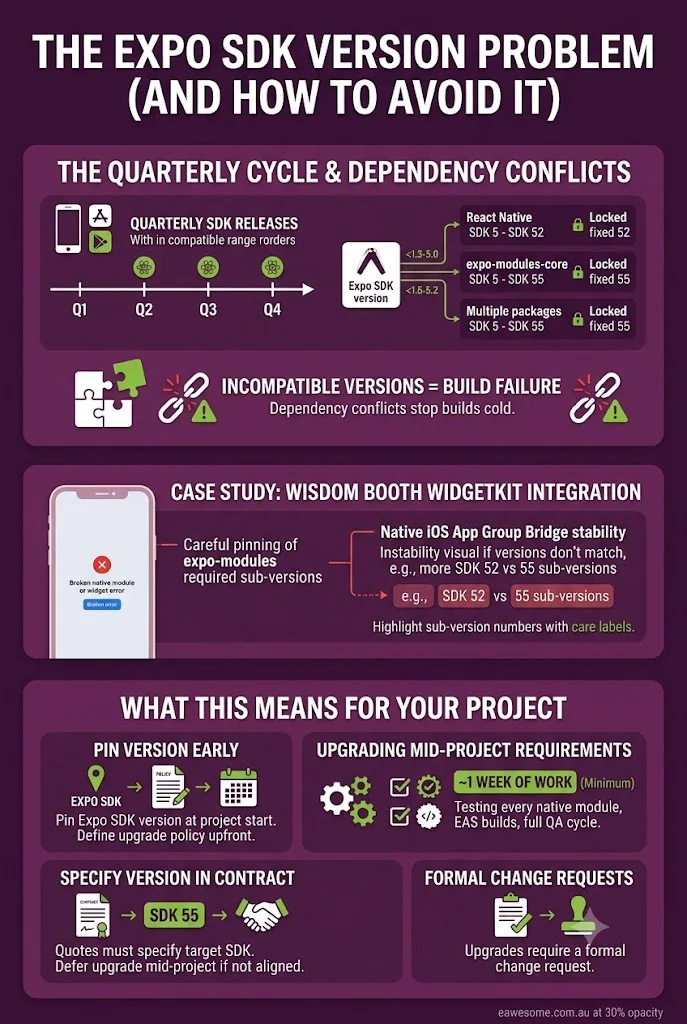
Expo releases a new SDK version roughly every quarter. Each SDK version specifies compatible ranges for React Native, expo-modules-core, and every individual package in the Expo ecosystem. When you mix incompatible versions — or when a project stays on an old SDK while packages update — you get dependency conflicts that can stop a build cold.
During the Wisdom Booth build, we worked with Expo SDK 52 and later 55 across multiple milestones. The WidgetKit integration (for the iOS home-screen widget) required careful pinning of the Expo modules version because the App Group bridge — the native iOS mechanism that lets the widget read data the main app wrote — was only stable on specific sub-versions.
What this means for your project:
Pin your Expo SDK version at the start of the project and define an upgrade policy upfront. Upgrading SDK mid-project is a valid choice but it’s at minimum a week of work (testing every native module, validating EAS builds, running through the full QA cycle). If the upgrade aligns with a significant milestone, budget for it explicitly. If it doesn’t, defer it.
A quote that doesn’t specify the Expo SDK target version is a budget risk. “We’ll use the latest Expo” sounds reasonable but means the developer can upgrade at will, and each upgrade can bring unexpected breakage. Specify the SDK version in the contract, and define that upgrades require a formal change request.
Where the Timeline Actually Goes: A Realistic Breakdown
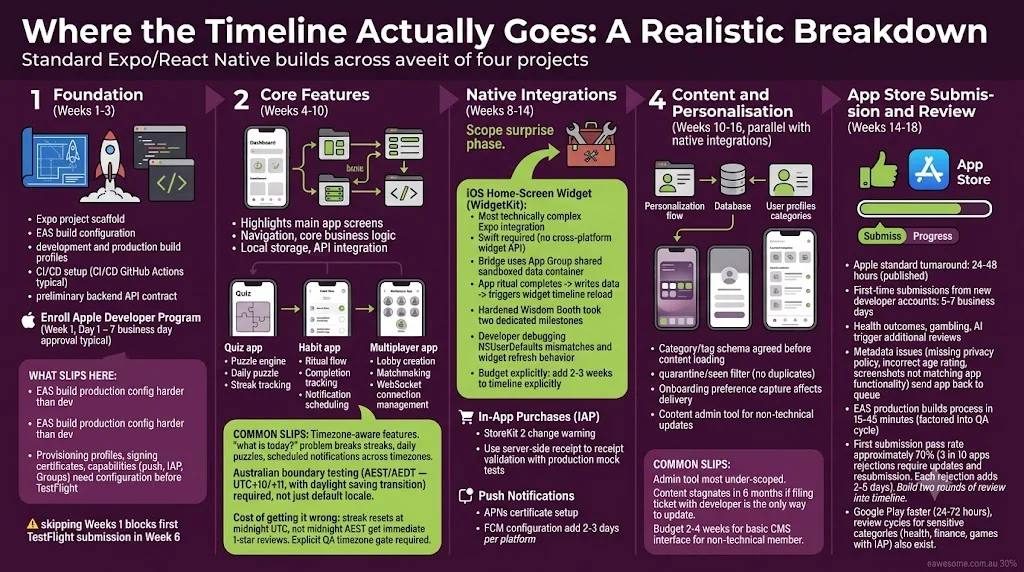
Across the four projects, here’s what a standard Expo/React Native build actually looks like when tracked against a realistic milestone plan:
Phase 1: Foundation (Weeks 1-3)
Expo project scaffold, EAS (Expo Application Services) build configuration, development and production build profiles, CI/CD setup (typically GitHub Actions), preliminary backend API contract agreed. Apple Developer Program membership enrolled (if not already — 7 business day approval time; start this on Day 1 of the project).
What slips here: EAS build configuration for production is harder than development. Provisioning profiles, signing certificates, and capability entitlements (push notifications, In-App Purchase, App Groups) need to be configured before the first TestFlight submission. Developers who skip this in Week 1 often block their first TestFlight submission in Week 6.
Phase 2: Core Features (Weeks 4-10)
Main app screens, navigation, core business logic, local storage, API integration. For a quiz app: puzzle engine, daily selection logic, streak tracking. For a habit app: ritual flow, completion tracking, notification scheduling. For a multiplayer app: lobby creation, matchmaking, WebSocket connection management.
What slips here: Timezone-aware features. Streak systems, daily puzzles, and scheduled notifications all have a “what is today?” problem that breaks across timezones. Building this correctly for an Australian audience (AEST/AEDT — UTC+10/+11, with daylight saving transition) requires explicit testing across the boundary, not just in the default locale.
Cost of getting it wrong: a streak app that resets streaks at midnight UTC rather than midnight AEST gets one-star reviews immediately. We test timezone handling explicitly as part of the QA gate on every project.
Phase 3: Native Integrations (Weeks 8-14)
This is the phase where most scope surprises occur.
iOS Home-Screen Widget (WidgetKit): This is the most technically complex Expo integration we’ve worked with. The widget itself is written in Swift (Apple requires it — there is no cross-platform widget API). The bridge between the widget and the React Native app uses an App Group — a shared sandboxed data container. When the app updates (the user completes their daily ritual), it writes the new data to the App Group and triggers a widget timeline reload. The widget reads from the App Group and updates on screen.
On Wisdom Booth, this integration took two dedicated build milestones to harden fully. The App Group provisioning, EAS build configuration, and Swift widget development are three separate disciplines that need to work in concert. A developer who hasn’t done this before will spend significant time debugging NSUserDefaults suite mismatches and widget timeline refresh behaviour. Budget explicitly: add 2-3 weeks to any timeline that includes an iOS widget.
In-App Purchases (IAP): Apple and Google’s IAP APIs are well-documented but have sharp edges. The most common issue: receipt validation. Apple’s receipt format changed with StoreKit 2, and projects using old validation code against new receipts fail silently. We use server-side receipt validation with a production-faithful mock in tests — which is the only way to catch validation regressions before they hit production.
Push Notifications: Relatively straightforward with Expo Notifications, but APNs (Apple Push Notification service) certificate setup and FCM (Firebase Cloud Messaging) configuration add 2-3 days per platform that need to be in the timeline.
Phase 4: Content and Personalisation (Weeks 10-16, parallel with native integrations)
Apps that serve personalised content — CineLadder’s content slices by cinema track and decade, Wisdom Booth’s tradition-filtered quote corpus — have a content architecture problem distinct from their technical architecture.
The content system needs:
- Category/tag schema agreed before any content is loaded
- A quarantine/seen filter so users don’t see the same item twice
- Preference capture during onboarding that actually affects content delivery
- A content admin tool for non-technical content updates
The most commonly underscoped item in content apps is the admin tool. If the only way to add new quotes, questions, or prompts is to file a ticket with the developer, your content will stagnate within six months. Budget 2-4 weeks for a basic content management interface that lets a non-technical team member add and retire content without a deployment.
Phase 5: App Store Submission and Review (Weeks 14-18)
Apple’s review process has a published turnaround of 24-48 hours for standard reviews. In practice:
- First-time submissions from new developer accounts can take 5-7 business days.
- Apps that reference health outcomes (weight loss, pain relief, mental health), gambling, or AI-generated content trigger additional review processes.
- Metadata issues (missing privacy policy, incorrect age rating, screenshot not matching app functionality) send the app back to the queue from the start.
- EAS production builds take 15-45 minutes to process; factor this into your QA-to-submit cycle.
Our first-submission pass rate is approximately 70%. That means 3 in 10 apps we submit get a rejection that requires an update and resubmission. Each rejection adds 2-5 days. Build two rounds of review time into your project timeline.
Google Play approval is faster (typically 24-72 hours) but also has review cycles for apps in sensitive categories (health, finance, games with IAP).
The 8 Scope Items That Almost Always Appear Mid-Project
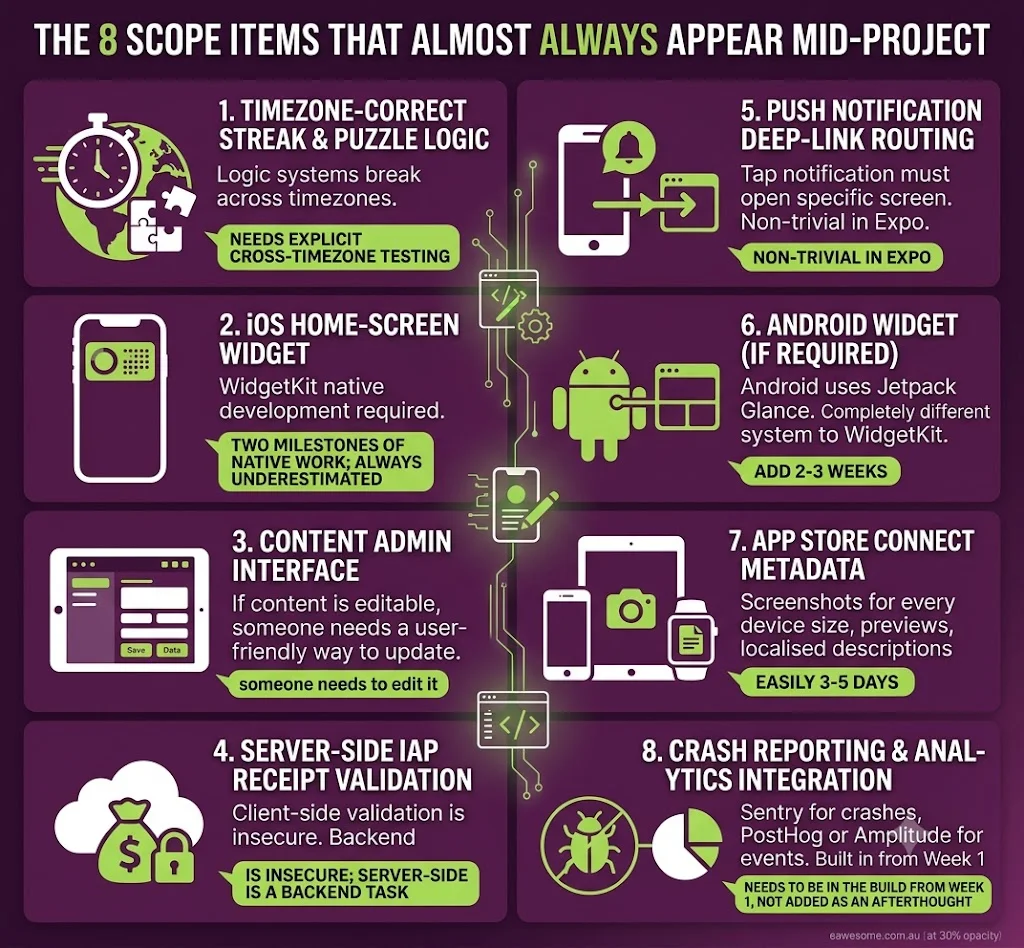
In roughly order of how often they weren’t in the original quote:
- Timezone-correct streak and daily-puzzle logic — needs explicit cross-timezone testing
- iOS home-screen widget — two milestones of native work; always underestimated
- Content admin interface — if the product has editable content, someone needs to edit it
- Server-side IAP receipt validation — client-side validation is insecure; server-side is a backend task
- Push notification deep-link routing — a tap on a notification should open the specific screen, not the home screen; routing logic is non-trivial in Expo
- Android widget (if required) — Android uses Jetpack Glance, a completely different system to WidgetKit; add 2-3 weeks
- App Store Connect metadata — screenshots for every device size, previews, localised descriptions; easily 3-5 days
- Crash reporting and analytics integration — Sentry for crashes, PostHog or Amplitude for events; needs to be in the build from Week 1, not added as an afterthought
Realistic Cost Ranges for Australian Businesses (2026)
| App type | Build timeline | Cost (AUD) | What’s included |
|---|---|---|---|
| Simple utility app (no backend, no IAP) | 8-12 weeks | $18,000-$30,000 | iOS + Android, basic push, App Store submission |
| Content/habit app with personalisation | 12-18 weeks | $30,000-$55,000 | Above + content system, streak engine, IAP |
| Daily habit app with iOS widget | 14-20 weeks | $38,000-$70,000 | Above + WidgetKit integration, App Group bridge |
| Quiz/engagement app with leagues | 16-22 weeks | $40,000-$75,000 | Above + league engine, push notifications, analytics |
| Real-time multiplayer app | 24-36 weeks | $80,000-$160,000 | Backend microservices, WebSocket, matchmaking, bots |
| Multi-tenant platform (multiple brands) | 36-52 weeks | $150,000-$300,000+ | Architecture, isolation, separate brand configs |
All figures are inclusive of iOS and Android, backend API, 3 months post-launch support, and App Store submission for both stores. Australian GST applies.
Ongoing maintenance: iOS and Android release OS updates 1-2 times per year. Expo SDK updates introduce breaking changes every quarter. An app requires $1,500-$3,500/month for compatibility maintenance, content updates, and minor feature additions after launch.
What to Ask Any Expo/React Native Developer Before You Sign
- What Expo SDK version will you build on, and what’s the upgrade policy?
- Have you built an iOS home-screen widget with an App Group bridge before? (Ask for a project reference if yes.)
- How do you handle timezone-aware features — show me a test?
- Is server-side IAP receipt validation in scope?
- What’s your first-submission App Store approval rate, and how many review rounds are included in the quote?
- What content admin interface is included for non-technical content updates?
- What crash reporting and analytics are included — and from which week?
- What’s your CI/CD setup — how does a fix get from code to TestFlight?
A developer who can answer all eight questions with specifics — not generalities — has done this before and is pricing a realistic scope. A developer who hedges on any of these items will encounter them as surprises.
For backend infrastructure, cloud hosting, and DevOps for your React Native app’s API layer — Cloud Geeks sets up and manages AWS, Cloudflare, and managed cloud infrastructure for Australian app backends, including ECS, RDS, and CI/CD pipelines.
Ash Ganda writes about digital product strategy for Australian businesses — including how to evaluate technology choices and vendor quotes for custom software.
Part of the Ganda Tech Services family, Awesome Apps builds iOS and Android applications for Australian small and medium businesses.
Frequently Asked Questions
How much does a React Native app cost in Australia in 2026? A straightforward utility app without a backend or IAP costs $18,000-$30,000 AUD. Apps with content personalisation, streak systems, and IAP sit at $30,000-$55,000. Apps with iOS home-screen widgets add $8,000-$15,000 to that. Real-time multiplayer apps start at $80,000. All quotes should include iOS, Android, backend API, and App Store submission.
How long does an Expo app take to build? 8-12 weeks for simple utility apps; 14-20 weeks for content/habit apps with iOS widgets; 24-36 weeks for real-time or multiplayer experiences. Add 2-4 weeks of contingency for App Store review rounds. Projects with multi-tenant backends or complex integrations run 36+ weeks.
Is Expo ready for production in 2026? Yes. Expo SDK 52+ supports a wide range of native features without ejecting: push notifications, camera, location, IAP, background tasks, WidgetKit (with native Swift modules), and over-the-air updates. The EAS (Expo Application Services) build and submission pipeline is reliable for production builds. The main caveat: deeply platform-specific features (Metal rendering, ARKit) still require a native module or full ejection.
What’s the difference between Expo and bare React Native? Expo provides a managed build environment (EAS), a standard project structure, and a library of pre-built native modules. Bare React Native gives you the raw project with full control over native code. Most Australian SMB apps don’t need bare React Native — the Expo managed workflow handles 95% of requirements. The remaining 5% (custom native code, complex background services) can be handled with Expo’s bare workflow or native modules without abandoning the ecosystem.
Should I build iOS-only first or iOS and Android together? For most Australian businesses: iOS-only first. Approximately 55% of Australian smartphone users are on iOS (higher in urban professional demographics). Building iOS-only reduces your initial build cost by 30-40% and gets you to market 6-8 weeks faster. With Expo, adding Android in version 2 is straightforward — you’re not rebuilding from scratch. Launch on iOS, validate your product with real users, then ship Android with the learnings incorporated.
Talk to a Sydney app developer — free.
30 minutes. We'll tell you what your app needs, how long it takes, and what it costs. Real answers, no sales pitch.
Book Free App Strategy Call →Free · 30 minutes · No obligation