Introduction
Speed is a feature. Research consistently shows that slow apps get abandoned—53% of users leave if a mobile page takes longer than 3 seconds to load. The same applies to apps: every 100ms of delay reduces conversions by 7%.
Performance isn’t just about raw speed; it’s about perceived speed. An app that shows content progressively feels faster than one that waits for everything before displaying anything, even if both take the same total time.
This guide covers practical techniques for improving mobile app performance, with code examples you can apply today.
Measuring Performance
You can’t improve what you don’t measure. Start with profiling.
iOS Instruments
Xcode’s Instruments is the primary tool for iOS performance analysis:
// Add signposts for custom measurements
import os.signpost

let log = OSLog(subsystem: "com.yourapp", category: "performance")

func loadData() {
    os_signpost(.begin, log: log, name: "loadData")

    // Your data loading code

    os_signpost(.end, log: log, name: "loadData")
}
Key metrics to track:
- Launch time: Time to first usable frame
- Frame rate: Target 60fps (16.67ms per frame)
- Memory usage: Watch for leaks and spikes
- CPU usage: Identify expensive operations
Android Profiler
Android Studio’s built-in profiler covers CPU, memory, network, and energy:
// Add trace sections for custom measurements
import android.os.Trace

fun loadData() {
    Trace.beginSection("loadData")
    try {
        // Your data loading code
    } finally {
        Trace.endSection()
    }
}
Firebase Performance Monitoring
For production metrics:
// iOS
import FirebasePerformance

func fetchProducts() async throws -> [Product] {
    let trace = Performance.startTrace(name: "fetch_products")

    do {
        let products = try await api.getProducts()
        trace?.setValue(Int64(products.count), forMetric: "product_count")
        trace?.stop()
        return products
    } catch {
        trace?.setValue(1, forMetric: "error")
        trace?.stop()
        throw error
    }
}
// Android
import com.google.firebase.perf.FirebasePerformance
suspend fun fetchProducts(): List<Product> {
val trace = FirebasePerformance.getInstance().newTrace("fetch_products")
trace.start()
return try {
val products = api.getProducts()
trace.putMetric("product_count", products.size.toLong())
products
} finally {
trace.stop()
}
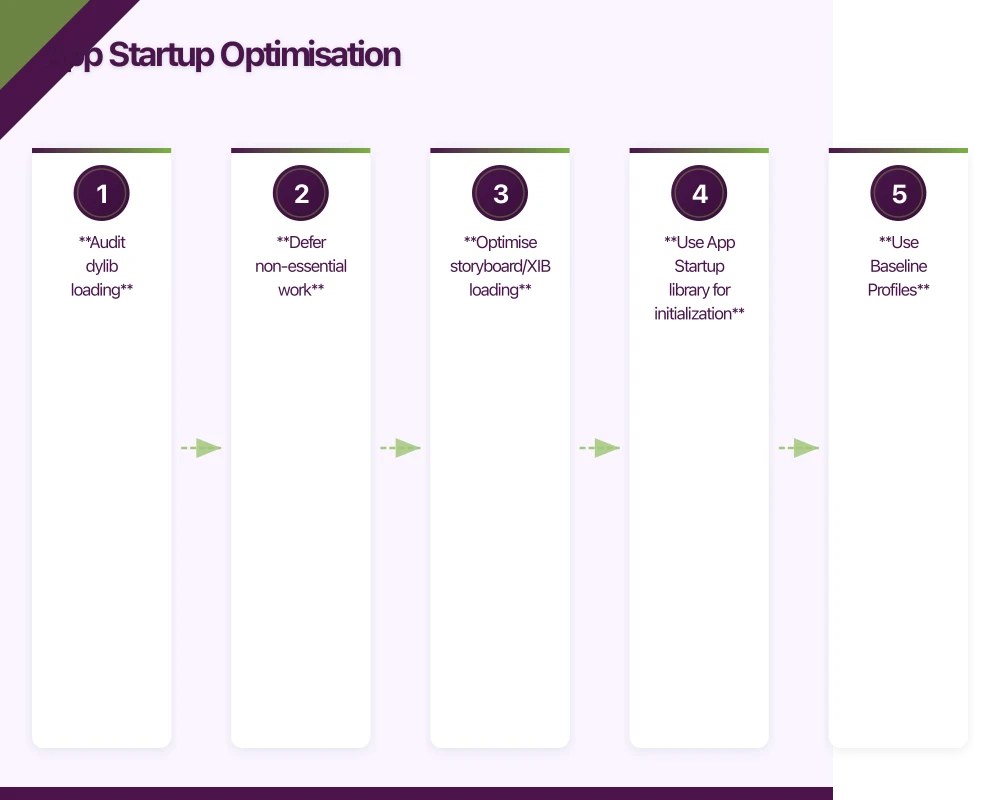
}App Startup Optimisation
First imp
 ressions matter. A slow launch makes users feel the whole app is slow.
iOS: Reduce Launch Time
- Audit dylib loading
Run your app with DYLD_PRINT_STATISTICS=1 to see library loading time:
Total pre-main time: 823.47 milliseconds (100.0%)
         dylib loading time: 512.34 milliseconds (62.2%)
        rebase/binding time:  45.12 milliseconds (5.5%)
            ObjC setup time:  78.45 milliseconds (9.5%)
           initializer time: 187.56 milliseconds (22.8%)
Fix: Remove unused frameworks, use static linking where possible.
- Defer non-essential work
@main
struct MyApp: App {
    init() {
        // Only essential initialization here
        configureEssentialServices()
    }

    var body: some Scene {
        WindowGroup {
            ContentView()
                .task {
                    // Defer non-essential setup
                    await performDeferredSetup()
                }
        }
    }

    private func configureEssentialServices() {
        // Only what's needed to show first screen
        FirebaseApp.configure()
    }

    private func performDeferredSetup() async {
        // Analytics, crash reporting, feature flags, etc.
        Analytics.configure()
        await PushNotifications.register()
        FeatureFlags.refresh()
    }
}- Optimise storyboard/XIB loading
Move to programmatic UI or SwiftUI for faster loading:
// Slow: Loading entire storyboard
let vc = UIStoryboard(name: "Main", bundle: nil)
    .instantiateViewController(withIdentifier: "HomeVC")

// Faster: Programmatic
let vc = HomeViewController()
Android: Reduce Startup Time
- Use App Startup library for initialization
// Instead of doing everything in Application.onCreate()
class MyApplication : Application() {
    override fun onCreate() {
        super.onCreate()
        // Don't initialize everything here
    }
}

// Use App Startup for deferred initialization
class AnalyticsInitializer : Initializer<Analytics> {
    override fun create(context: Context): Analytics {
        return Analytics.init(context)
    }

    override fun dependencies(): List<Class<out Initializer<*>>> = emptyList()
}

// In AndroidManifest.xml, use tools:node="remove" for automatic initializers
// you want to defer- Use Baseline Profiles
Baseline Profiles pre-compile critical code paths:
// In benchmark module
@ExperimentalBaselineProfilesApi
@RunWith(AndroidJUnit4::class)
class BaselineProfileGenerator {
    @get:Rule
    val baselineProfileRule = BaselineProfileRule()

    @Test
    fun generateBaselineProfile() = baselineProfileRule.collectBaselineProfile(
        packageName = "com.yourapp"
    ) {
        // Navigate through critical user journeys
        pressHome()
        startActivityAndWait()

        // Interact with home screen
        device.findObject(By.text("Products")).click()
        device.waitForIdle()
    }
}- Lazy initialization
class Repository @Inject constructor(
    private val apiProvider: Provider<ApiService> // Lazy via Provider
) {
    // ApiService isn't created until first use
    suspend fun getProducts() = apiProvider.get().getProducts()
}

// Or with lazy delegate
class HomeViewModel : ViewModel() {
    private val heavyService by lazy { HeavyService() }
}
Rendering Performance
Smooth scrolling requires maintaining 60fps (16ms per frame).
iOS: Avoid Off-Main-Thread Warnings
// Bad: Blocking main thread
func loadImage(url: URL) -> UIImage? {
    let data = try? Data(contentsOf: url) // Blocks main thread!
    return UIImage(data: data)
}

// Good: Async loading
func loadImage(url: URL) async -> UIImage? {
    let (data, _) = try? await URLSession.shared.data(from: url)
    return data.flatMap { UIImage(data: $0) }
}
iOS: Optimise Collection Views
class ProductCell: UICollectionViewCell {
    // Pre-size content to avoid layout passes
    override func preferredLayoutAttributesFitting(
        _ layoutAttributes: UICollectionViewLayoutAttributes
    ) -> UICollectionViewLayoutAttributes {
        let attributes = super.preferredLayoutAttributesFitting(layoutAttributes)

        // Use cached size if available
        if let cachedSize = ProductSizeCache.shared.size(for: product.id) {
            attributes.size = cachedSize
            return attributes
        }

        // Calculate and cache
        let size = contentView.systemLayoutSizeFitting(
            UIView.layoutFittingCompressedSize
        )
        ProductSizeCache.shared.setSize(size, for: product.id)
        attributes.size = size

        return attributes
    }
}

// Use cell registration for type safety
extension UICollectionView {
    func register<T: UICollectionViewCell>(_ cellType: T.Type) {
        register(cellType, forCellWithReuseIdentifier: String(describing: cellType))
    }

    func dequeue<T: UICollectionViewCell>(_ cellType: T.Type, for indexPath: IndexPath) -> T {
        dequeueReusableCell(withReuseIdentifier: String(describing: cellType), for: indexPath) as! T
    }
}
Android: RecyclerView Optimisation
class ProductAdapter : ListAdapter<Product, ProductViewHolder>(ProductDiffCallback()) {

    // Enable stable IDs for better recycling
    init {
        setHasStableIds(true)
    }

    override fun getItemId(position: Int): Long {
        return getItem(position).id.hashCode().toLong()
    }

    override fun onCreateViewHolder(parent: ViewGroup, viewType: Int): ProductViewHolder {
        // Avoid inflation in onBindViewHolder
        val binding = ItemProductBinding.inflate(
            LayoutInflater.from(parent.context), parent, false
        )
        return ProductViewHolder(binding)
    }

    override fun onBindViewHolder(holder: ProductViewHolder, position: Int) {
        holder.bind(getItem(position))
    }
}

// In fragment/activity
recyclerView.apply {
    // Set fixed size if content doesn't change
    setHasFixedSize(true)

    // Cache off-screen items
    setItemViewCacheSize(20)

    // Pre-fetch items during scroll
    layoutManager = LinearLayoutManager(context).apply {
        initialPrefetchItemCount = 5
    }
}

// Use DiffUtil for efficient updates
class ProductDiffCallback : DiffUtil.ItemCallback<Product>() {
    override fun areItemsTheSame(oldItem: Product, newItem: Product) =
        oldItem.id == newItem.id

    override fun areContentsTheSame(oldItem: Product, newItem: Product) =
        oldItem == newItem
}
Image Optimisation
Images are often the biggest performance culprit.
iOS: Use Modern Image Loading
// With SwiftUI
AsyncImage(url: product.imageURL) { phase in
    switch phase {
    case .empty:
        ProgressView()
    case .success(let image):
        image
            .resizable()
            .aspectRatio(contentMode: .fill)
    case .failure:
        Image(systemName: "photo")
    @unknown default:
        EmptyView()
    }
}
.frame(width: 150, height: 150)

// For more control, use a library like Kingfisher
KFImage(product.imageURL)
    .placeholder {
        ProgressView()
    }
    .resizable()
    .aspectRatio(contentMode: .fill)
    .frame(width: 150, height: 150)
    .downsampling(size: CGSize(width: 300, height: 300)) // 2x for retina
    .cacheMemoryOnly()
Android: Use Coil or Glide
// With Coil (Jetpack Compose)
@Composable
fun ProductImage(url: String) {
    AsyncImage(
        model = ImageRequest.Builder(LocalContext.current)
            .data(url)
            .crossfade(true)
            .size(300, 300) // Resize before loading
            .build(),
        contentDescription = null,
        modifier = Modifier.size(150.dp),
        contentScale = ContentScale.Crop
    )
}

// With Glide (traditional views)
Glide.with(context)
    .load(url)
    .override(300, 300) // Target size in pixels
    .centerCrop()
    .diskCacheStrategy(DiskCacheStrategy.ALL)
    .into(imageView)
Serve Optimised Images
Backend should serve appropriately sized images:
// API endpoint with size parameter
app.get('/images/:id', async (req, res) => {
  const { id } = req.params;
  const { w, h, q } = req.query; // width, height, quality

  const width = parseInt(w as string) || 800;
  const height = parseInt(h as string) || 800;
  const quality = parseInt(q as string) || 80;

  const optimised = await sharp(`./originals/${id}`)
    .resize(width, height, { fit: 'inside' })
    .webp({ quality })
    .toBuffer();

  res.set('Content-Type', 'image/webp');
  res.set('Cache-Control', 'public, max-age=31536000');
  res.send(optimised);
});
Memory Management
Memory issues cause crashes and slow performance.
iOS: Detect and Fix Leaks
// Use weak references for delegates
protocol ProductViewDelegate: AnyObject {
    func didSelectProduct(_ product: Product)
}

class ProductView: UIView {
    weak var delegate: ProductViewDelegate? // Weak to prevent retain cycle
}

// Use capture lists in closures
class ProductViewController: UIViewController {
    func loadProducts() {
        productService.fetch { [weak self] result in
            guard let self = self else { return }
            self.handleResult(result)
        }
    }
}

// Profile with Instruments > Leaks
// Or use runtime checks in debug:
#if DEBUG
deinit {
    print("\(type(of: self)) deallocated")
}
#endif
Android: Avoid Common Memory Leaks
// Don't hold Context references
class ProductRepository(
    private val applicationContext: Context // Use Application context
) {
    // NOT: private val context: Activity
}

// Cancel coroutines properly
class ProductViewModel : ViewModel() {
    private val _products = MutableStateFlow<List<Product>>(emptyList())

    fun loadProducts() {
        viewModelScope.launch { // Cancelled automatically when ViewModel clears
            _products.value = repository.getProducts()
        }
    }
}

// Use lifecycle-aware components
class ProductFragment : Fragment() {
    override fun onViewCreated(view: View, savedInstanceState: Bundle?) {
        // Collect in viewLifecycleOwner scope, not fragment scope
        viewLifecycleOwner.lifecycleScope.launch {
            viewModel.products.collect { products ->
                adapter.submitList(products)
            }
        }
    }
}
Network Optimisation
Reduce data transfer and wait times.
Request Batching
// Instead of individual requests
const products = await Promise.all(ids.map(id => api.getProduct(id)));

// Batch into single request
const products = await api.getProducts({ ids });
Response Compression
// iOS: URLSession handles compression automatically
// Just ensure your server sends gzipped responses

// Backend: Enable compression
app.use(compression()); // Express
Caching Strategy
// iOS: Configure URLCache
let cache = URLCache(
    memoryCapacity: 50 * 1024 * 1024,  // 50MB memory
    diskCapacity: 200 * 1024 * 1024,   // 200MB disk
    diskPath: "urlcache"
)
URLCache.shared = cache

// Respect cache headers in your API
let config = URLSessionConfiguration.default
config.urlCache = URLCache.shared
config.requestCachePolicy = .useProtocolCachePolicy
Quick Wins Checklist
Optimisation areas with high impact and low effort:
iOS
- Enable compiler optimisations in Release (
-Oflag) - Remove unused imports and frameworks
- Use
@MainActoronly where needed - Pre-compute expensive calculations
- Use lazy loading for expensive views
- Enable Asset Catalog compression
Android
- Enable R8/ProGuard minification
- Generate Baseline Profiles
- Use
coil-composeorglidefor images - Enable
strictModein debug to catch issues - Use
suspendfunctions instead of callbacks - Configure appropriate
diskCacheStrategy
Both Platforms
- Implement proper pagination
- Add response caching
- Optimise images on the server
- Defer non-essential network calls
- Measure before and after changes
Conclusion
Mobile performance optimisation is iterative. Start with measurement, identify the biggest bottlenecks, fix them, and measure again.
The highest impact optimisations are usually:
- Reduce startup time — defer non-essential initialization
- Optimise images — resize and cache appropriately
- Smooth scrolling — recycle views, pre-fetch data
- Reduce network calls — batch requests, use caching
Don’t optimise prematurely. Profile first, focus on the real bottlenecks, and verify improvements with measurements. A 10% improvement in startup time that users notice is worth more than a 50% improvement in an operation that wasn’t slow enough to matter.
Your app needs secure, low-latency APIs. Cloud Geeks builds and manages cloud backends optimised for mobile applications.
Ashish Ganda is the founder of Ganda Tech Services, a Sydney-based technology consultancy helping Australian businesses grow through cloud, web, and mobile solutions.
Talk to a Sydney app developer — free.
30 minutes. We'll tell you what your app needs, how long it takes, and what it costs. Real answers, no sales pitch.
Book Free App Strategy Call →Free · 30 minutes · No obligation