Introduction
Shipping an app straight to production without real-world testing is a recipe for bad reviews and emergency patches. Beta testing lets you find issues before they affect all your users, validate features with real people, and build confidence before launch.
This guide covers how to set up and run effective beta tests using Apple’s TestFlight and Google Play’s testing tracks.
Why Beta Test
Find Real Problems
Testing in development environments has limitations:
- Developers test their own code (bias)
- Limited device diversity
- Artificial usage patterns
- Missing edge cases
Real users find problems you never anticipated.
Validate Assumptions
Beta testing answers crucial questions:
- Do users understand the interface?
- Does the core value proposition resonate?
- Are there confusing or frustrating flows?
- Does performance hold up under real conditions?
Build Launch Confidence
Going live feels less risky when you:
- Know it works on diverse devices
- Have addressed major issues
- Understand user reactions
- Have metrics from real usage
iOS Beta Testing with TestFlight
Set
 ting Up TestFlight
Prerequisites
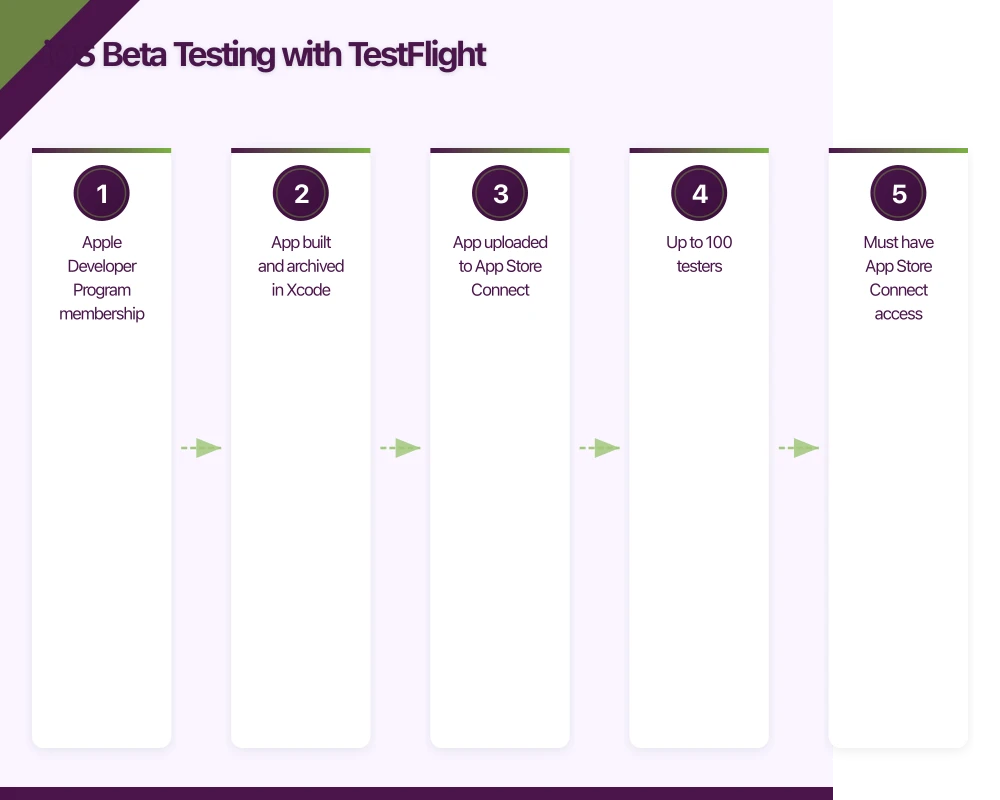
- Apple Developer Program membership ($99/year)
- App built and archived in Xcode
- App uploaded to App Store Connect
Creating a Test Group
- Log into App Store Connect
- Select your app
- Go to TestFlight tab
- Add internal or external test group
- Invite testers
Internal vs External Testing
Internal Testing
- Up to 100 testers
- Must have App Store Connect access
- No review required
- Instant distribution
- Good for team members and close stakeholders
External Testing
- Up to 10,000 testers
- Anyone with email address
- Requires beta review by Apple
- Review typically 24-48 hours
- Suitable for larger beta programs
Managing TestFlight Builds
Build Distribution
- Upload from Xcode or CI/CD pipeline
- Builds auto-expire after 90 days
- Can have multiple builds available
- Control which groups get which builds
Version Management
Organise builds logically:
- Build numbers increment with each upload
- Version numbers reflect release stages
- Notes describe what changed
- Expired builds are cleaned up automatically
Collecting Feedback
Built-in Options
TestFlight provides:
- Crash reports (automatic)
- Screenshots in feedback
- User-initiated feedback from app
- Tester email for direct contact
Enhancing Feedback
Integrate additional tools:
- In-app feedback buttons
- Analytics for usage patterns
- Session recording (where appropriate)
- Dedicated feedback forms
Android Beta Testing with Google Play
Tes
ting Tracks
Google Play offers three testing tracks:
Internal Testing
- Up to 100 testers
- No review required
- Instant availability
- Email list management
- Good for early testing and team
Closed Testing
- Unlimited testers (with email lists or Google Groups)
- Requires review (usually hours)
- Multiple closed tracks possible
- Can target specific countries or device types
Open Testing
- Anyone can join
- Visible on Play Store listing
- Shows “Early Access” badge
- Collects public ratings (separate from production)
Setting Up Testing
Create Test Track
- Open Google Play Console
- Select your app
- Go to Testing section
- Choose track type
- Configure settings
Managing Testers
- Add emails individually or via list upload
- Use Google Groups for larger lists
- Generate join links for self-signup (closed testing)
- Control access by country if needed
Staged Rollouts
For production releases, consider:
- Start with small percentage (5-10%)
- Monitor crash rates and feedback
- Increase gradually
- Full rollout once confident
Not technically beta, but useful safety net for new releases.
Recruiting Beta Testers
Who Makes Good Testers
Ideal Characteristics
- Matches your target audience
- Willing to provide feedback
- Tolerant of bugs
- Diverse devices and usage patterns
- Available for the testing period
Where to Find Them
- Existing users or waitlist signups
- Social media followers
- Industry communities and forums
- Friends of employees (but don’t only use these)
- Beta testing platforms
Beta Testing Platforms
Services that connect you with testers:
- BetaFamily - iOS and Android testers
- TestFairy - Distribution plus analytics
- Firebase App Distribution - Google’s solution
- Betabound - Tester community
Consider these for:
- Broader device coverage
- Users outside your network
- Specific demographic targeting
Managing Expectations
Be Clear About
- What you’re testing
- Expected level of bugs
- How to provide feedback
- Time commitment expected
- Whether they’ll get the final app
Don’t Promise
- Payment (unless you’re actually paying)
- Specific launch dates
- Features that might not ship
- Indefinite free access
Running Effective Tests
Planning Your Beta
Define Goals
What specifically are you testing?
- Core functionality stability
- New feature reception
- Performance on various devices
- Specific user flows
- Onboarding effectiveness
Set Timeline
Reasonable beta phases:
- Internal testing: 1-2 weeks
- Closed beta: 2-4 weeks
- Open beta (if needed): 2-4 weeks
Shorter if iterating quickly, longer for complex apps.
Determine Success Criteria
When is the beta “done”?
- Crash rate below threshold
- No critical bugs reported
- Positive feedback ratio
- Core metrics meeting targets
Collecting Quality Feedback
Make Feedback Easy
- Prominent feedback button in app
- Short, focused feedback forms
- Don’t require login to submit
- Acknowledge submissions
Ask Good Questions
Open-ended but focused:
- “What were you trying to do when you encountered this problem?”
- “What did you expect to happen?”
- “Anything confusing about this feature?”
Contextual Feedback
Capture relevant information:
- Device model and OS version
- App version
- What the user was doing
- Screenshots or screen recordings
Analysing Feedback
Categorisation
Sort feedback by type:
- Bugs (things that are broken)
- UX issues (things that are confusing)
- Feature requests (things people want)
- Performance (things that are slow)
Prioritisation
Triage based on:
- Severity (how bad is it?)
- Frequency (how often does it happen?)
- Impact (how many users affected?)
- Effort to fix
Communication
Keep testers informed:
- Acknowledge bug reports
- Share when issues are fixed
- Thank people for valuable feedback
- Explain when something won’t be addressed
Common Beta Testing Mistakes
Too Few Testers
Testing with five friends isn’t beta testing. You need:
- Diverse devices
- Different usage patterns
- People who aren’t invested in your success
- Statistically meaningful feedback
Too Short Duration
“We tested for three days” isn’t sufficient:
- People need time to use it naturally
- Issues take time to surface
- Multiple iterations may be needed
- Don’t rush to launch
Ignoring Feedback
If you’re not going to act on feedback, why test?
- Address issues or explain why not
- Don’t ask for feedback then ignore it
- Testers notice when nothing changes
- Builds cynicism for future tests
Testing Too Late
Beta should happen before you’re “done”:
- Time to make meaningful changes
- Not just bug fixes
- UX improvements possible
- Feature adjustments allowed
Poor Communication
Testers need context:
- What’s changed in each build
- What you’re specifically looking for
- How to report issues effectively
- When testing ends
Tools and Infrastructure
Distribution
TestFlight (iOS)
- Native Apple solution
- Free
- Integrated with App Store Connect
- Standard for iOS beta
Firebase App Distribution (Both platforms)
- Works for iOS and Android
- Good for pre-TestFlight iOS testing
- Integrates with Firebase ecosystem
- Free tier available
Alternative Services
- Diawi - Ad-hoc iOS distribution
- AppCenter - Microsoft’s solution
- Appetize - Browser-based testing
Crash Reporting
Essential for understanding issues:
- Firebase Crashlytics - Free, comprehensive
- Sentry - More developer features
- Bugsnag - Good stability metrics
Analytics
Understanding usage patterns:
- Firebase Analytics - Free, integrates with Google
- Mixpanel - Event-based analytics
- Amplitude - Product analytics
Feedback Collection
Structured feedback capture:
- Instabug - In-app feedback and bug reporting
- Usersnap - Visual feedback tool
- UserVoice - Feature voting and feedback
After Beta
Pre-Launch Checklist
Before going live:
- All critical bugs fixed
- Crash rate acceptable
- Performance within targets
- App store metadata ready
- Support resources prepared
Learn and Document
Capture lessons:
- What issues were found?
- What feedback was most valuable?
- What would you do differently?
- What should the next beta include?
Thank Your Testers
People who helped deserve recognition:
- Thank you messages
- Early access to production
- Credits in app if appropriate
- Discounts or perks where applicable
Conclusion
Beta testing isn’t a checkbox—it’s a critical phase that determines whether your launch succeeds or struggles. Invest the time to do it properly.
Recruit real users. Give them time to actually use the app. Listen to their feedback. Fix what matters. Ship with confidence.
The alternative—discovering problems after launch—costs far more in bad reviews, lost users, and emergency patches.
From staging environments to production servers, Cloud Geeks manages the cloud infrastructure that mobile apps depend on.
This article is brought to you by Ganda Tech Services — Sydney’s complete digital solutions provider covering cloud, web, and mobile.
Talk to a Sydney app developer — free.
30 minutes. We'll tell you what your app needs, how long it takes, and what it costs. Real answers, no sales pitch.
Book Free App Strategy Call →Free · 30 minutes · No obligation