Mobile App UX: Building Fast and Reliable API Backends
Your mobile app UX is only as good as its API backend. A beautiful UI backed by a slow, unreliable backend creates frustrated users and poor mobile app UX. This is especially true for Australian app development, where the tyranny of distance means higher baseline latency to overseas cloud regions.
This guide covers how to design and build APIs that mobile apps love—fast, predictable, and resilient to the network conditions real users face.
REST vs GraphQL for Mobile
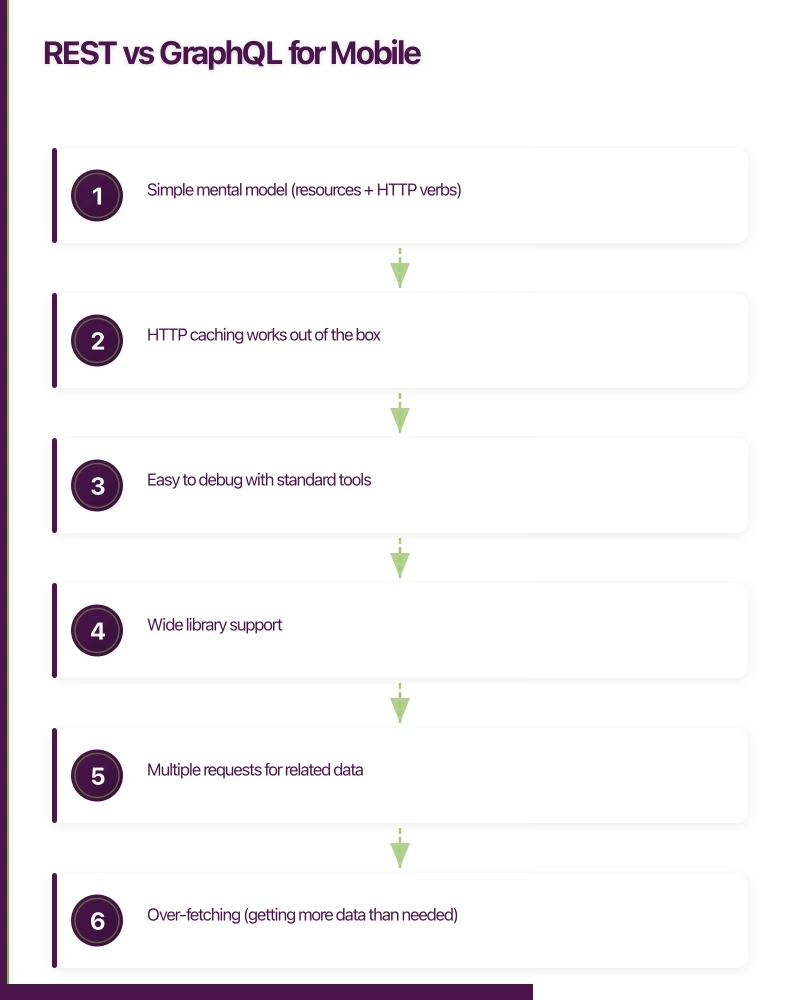
The first decision: what style of API?
REST: The Default Choice
REST remains the most common choice for mobile backends. It’s simple, well-understood, and works well for most apps.
Strengths:
- Simple mental model (resources + HTTP verbs)
- HTTP caching works out of the box
- Easy to debug with standard tools
- Wide library support
Weaknesses:
- Multiple requests for related data
- Over-fetching (getting more data than needed)
- Under-fetching (needing multiple requests)
GraphQL: When Flexibility Matters
GraphQL lets clients request exactly the data they need in a single request.
Strengths:
- Single request for complex data needs
- Clients specify exact fields needed
- Strong typing with schema
- Great for apps with varied data needs
Weaknesses:
- HTTP caching is harder
- More complex backend implementation
- Potential for expensive queries (N+1 problems)
- Steeper learning curve
Our Recommendation
For most mobile apps, REST with a few GraphQL-like features works best:
- Use REST for straightforward CRUD operations
- Add specific “aggregate” endpoints for complex screens
- Support field selection via query parameters
# Standard REST
GET /api/orders/123

# REST with field selection
GET /api/orders/123?fields=id,status,total,items.name,items.quantity

# Aggregate endpoint for a specific screen
GET /api/dashboard
# Returns: recent orders, notifications, user stats - everything the screen needs
Designing for Mobile Lat
ency
Australian users accessing US or European servers face 200-300ms base latency. Every API round-trip costs.
Reduce Round Trips
Bad: Multiple sequential requests
// Mobile app makes 4 sequential requests
const user = await api.get('/users/me');           // 300ms
const orders = await api.get('/orders');            // 300ms
const notifications = await api.get('/notifications'); // 300ms
const recommendations = await api.get('/recommendations'); // 300ms
// Total: 1200ms minimum
Good: Single aggregated request
// Mobile app makes 1 request
const dashboard = await api.get('/dashboard');
// Returns { user, orders, notifications, recommendations }
// Total: 300ms
Use Compression
Enable gzip/brotli compression. It’s a free performance win.
// Express.js
import compression from 'compression';
app.use(compression());

// Response headers
app.use((req, res, next) => {
  res.set('Vary', 'Accept-Encoding');
  next();
});
Pagination Done Right
Never return unbounded lists. Use cursor-based pagination for infinite scroll UIs.
// Endpoint
GET /api/orders?cursor=abc123&limit=20

// Response
{
  "data": [...],
  "pagination": {
    "nextCursor": "def456",
    "hasMore": true,
    "totalCount": 342  // Optional - expensive for large datasets
  }
}
Why cursor pagination over offset/limit?
- Stable results when data changes between requests
- Performs well regardless of how deep you scroll
- Natural fit for infinite scroll UIs
// Backend implementation
async function getOrders(userId: string, cursor?: string, limit = 20) {
  const query = db('orders').where('user_id', userId);

  if (cursor) {
    // Cursor is the last item's sort value (e.g., created_at timestamp)
    const decodedCursor = Buffer.from(cursor, 'base64').toString();
    query.where('created_at', '<', decodedCursor);
  }

  const orders = await query
    .orderBy('created_at', 'desc')
    .limit(limit + 1); // Fetch one extra to check hasMore

  const hasMore = orders.length > limit;
  const results = hasMore ? orders.slice(0, -1) : orders;

  const nextCursor = hasMore
    ? Buffer.from(results[results.length - 1].created_at).toString('base64')
    : null;

  return {
    data: results,
    pagination: { nextCursor, hasMore },
  };
}
API Response
Structure
Consistent response structure makes mobile development easier.
Success Responses
{
  "data": {
    "id": "order_123",
    "status": "shipped",
    "total": 149.99
  },
  "meta": {
    "requestId": "req_abc123",
    "timestamp": "2025-08-10T10:30:00Z"
  }
}
List Responses
{
  "data": [
    { "id": "order_123", "status": "shipped" },
    { "id": "order_124", "status": "delivered" }
  ],
  "pagination": {
    "nextCursor": "cursor_xyz",
    "hasMore": true
  },
  "meta": {
    "requestId": "req_abc123"
  }
}
Error Responses
{
  "error": {
    "code": "VALIDATION_ERROR",
    "message": "Invalid request data",
    "details": [
      {
        "field": "email",
        "message": "Must be a valid email address"
      }
    ]
  },
  "meta": {
    "requestId": "req_abc123"
  }
}
HTTP Status Codes
Use them correctly:
| Code | When to Use |
|---|---|
| 200 | Success |
| 201 | Resource created |
| 204 | Success, no content (DELETE) |
| 400 | Bad request (validation error) |
| 401 | Not authenticated |
| 403 | Not authorized |
| 404 | Resource not found |
| 409 | Conflict (duplicate entry) |
| 422 | Unprocessable entity (business logic error) |
| 429 | Rate limited |
| 500 | Server error |
Caching Strategies
Proper caching dramatically improves mobile app performance.
HTTP Caching Headers
// For mostly-static data (e.g., product catalog)
res.set({
  'Cache-Control': 'public, max-age=3600',  // Cache for 1 hour
  'ETag': generateETag(data),
});

// For user-specific but slowly-changing data
res.set({
  'Cache-Control': 'private, max-age=300',  // 5 minutes
  'Vary': 'Authorization',
});

// For real-time data
res.set({
  'Cache-Control': 'no-store',
});
ETags for Conditional Requests
ETags let clients check if data has changed without downloading it again.
// Backend
app.get('/api/products/:id', async (req, res) => {
  const product = await getProduct(req.params.id);
  const etag = generateETag(product);

  // Check if client has current version
  if (req.headers['if-none-match'] === etag) {
    return res.status(304).send(); // Not Modified
  }

  res.set('ETag', etag);
  res.json({ data: product });
});

function generateETag(data: any): string {
  const hash = crypto.createHash('md5')
    .update(JSON.stringify(data))
    .digest('hex');
  return `"${hash}"`;
}
// iOS client
class APIClient {
private var etagCache: [String: String] = [:]
func fetch<T: Decodable>(_ endpoint: String) async throws -> T {
var request = URLRequest(url: URL(string: baseURL + endpoint)!)
if let etag = etagCache[endpoint] {
request.setValue(etag, forHTTPHeaderField: "If-None-Match")
}
let (data, response) = try await URLSession.shared.data(for: request)
if let httpResponse = response as? HTTPURLResponse {
if httpResponse.statusCode == 304 {
// Return cached data
return try getCachedData(for: endpoint)
}
if let etag = httpResponse.value(forHTTPHeaderField: "ETag") {
etagCache[endpoint] = etag
cacheData(data, for: endpoint)
}
}
return try JSONDecoder().decode(T.self, from: data)
}
}Error Handling
Good error handling improves both developer and user experience.
Machine-Readable Error Codes
enum ErrorCode {
  VALIDATION_ERROR = 'VALIDATION_ERROR',
  NOT_FOUND = 'NOT_FOUND',
  UNAUTHORIZED = 'UNAUTHORIZED',
  FORBIDDEN = 'FORBIDDEN',
  CONFLICT = 'CONFLICT',
  RATE_LIMITED = 'RATE_LIMITED',
  INTERNAL_ERROR = 'INTERNAL_ERROR',
}

class APIError extends Error {
  constructor(
    public code: ErrorCode,
    public message: string,
    public statusCode: number,
    public details?: any[]
  ) {
    super(message);
  }
}

// Usage
throw new APIError(
  ErrorCode.VALIDATION_ERROR,
  'Invalid order data',
  400,
  [
    { field: 'quantity', message: 'Must be at least 1' }
  ]
);
Global Error Handler
app.use((err: Error, req: Request, res: Response, next: NextFunction) => {
  const requestId = req.headers['x-request-id'] || generateRequestId();

  // Log for debugging
  console.error({
    requestId,
    error: err.message,
    stack: err.stack,
    path: req.path,
    method: req.method,
  });

  if (err instanceof APIError) {
    return res.status(err.statusCode).json({
      error: {
        code: err.code,
        message: err.message,
        details: err.details,
      },
      meta: { requestId },
    });
  }

  // Unknown error - don't leak details
  res.status(500).json({
    error: {
      code: 'INTERNAL_ERROR',
      message: 'An unexpected error occurred',
    },
    meta: { requestId },
  });
});
Retry-After Header
For rate limiting, tell clients when to retry:
app.use('/api', rateLimit({
  windowMs: 60 * 1000,
  max: 100,
  handler: (req, res) => {
    res.set('Retry-After', '60');
    res.status(429).json({
      error: {
        code: 'RATE_LIMITED',
        message: 'Too many requests',
      }
    });
  }
}));
Authentication for Mobile
JWT tokens work well for mobile apps, but handle them correctly.
Token Structure
// Access token - short-lived
interface AccessToken {
  sub: string;           // User ID
  iat: number;           // Issued at
  exp: number;           // Expires (15 minutes)
  scope: string[];       // Permissions
}

// Refresh token - long-lived, stored securely
interface RefreshToken {
  sub: string;
  iat: number;
  exp: number;           // Expires (30 days)
  jti: string;           // Unique ID for revocation
}
Token Refresh Flow
// Backend
app.post('/api/auth/refresh', async (req, res) => {
  const { refreshToken } = req.body;

  try {
    const payload = jwt.verify(refreshToken, REFRESH_SECRET);

    // Check if token was revoked
    const isRevoked = await isTokenRevoked(payload.jti);
    if (isRevoked) {
      throw new Error('Token revoked');
    }

    // Issue new tokens
    const newAccessToken = generateAccessToken(payload.sub);
    const newRefreshToken = generateRefreshToken(payload.sub);

    // Revoke old refresh token (rotation)
    await revokeToken(payload.jti);

    res.json({
      data: {
        accessToken: newAccessToken,
        refreshToken: newRefreshToken,
        expiresIn: 900, // 15 minutes
      }
    });
  } catch (error) {
    res.status(401).json({
      error: { code: 'INVALID_TOKEN', message: 'Invalid refresh token' }
    });
  }
});
// iOS client
class AuthManager {
private var accessToken: String?
private var refreshToken: String?
private var expiresAt: Date?
func getValidToken() async throws -> String {
if let token = accessToken, let expires = expiresAt, expires > Date() {
return token
}
// Token expired, refresh it
return try await refreshAccessToken()
}
private func refreshAccessToken() async throws -> String {
guard let refresh = refreshToken else {
throw AuthError.notAuthenticated
}
let response = try await api.post("/auth/refresh", body: [
"refreshToken": refresh
])
accessToken = response.accessToken
refreshToken = response.refreshToken
expiresAt = Date().addingTimeInterval(TimeInterval(response.expiresIn))
return accessToken!
}
}Hosting for Australian Apps
Latency to your API server directly impacts user experience.
Cloud Region Selection
| Provider | Australian Region | Typical Latency |
|---|---|---|
| AWS | Sydney (ap-southeast-2) | 5-20ms |
| GCP | Sydney (australia-southeast1) | 5-20ms |
| Azure | Sydney (australiaeast) | 5-20ms |
| Cloudflare Workers | Multiple edge locations | less than 10ms |
CDN for API Responses
For cacheable API responses, use a CDN:
// With Cloudflare
// wrangler.toml
name = "api"
main = "src/index.ts"
compatibility_date = "2025-01-01"

[vars]
ENVIRONMENT = "production"

[[routes]]
pattern = "api.yourapp.com/*"
zone_name = "yourapp.com"
Database Location
Keep your database in the same region as your API servers. Cross-region database queries add 100-200ms per query.
// AWS RDS in Sydney
const dbConfig = {
  host: 'mydb.ap-southeast-2.rds.amazonaws.com',
  // ...
};
Monitoring and Observability
You can’t optimise what you don’t measure.
Essential Metrics
import { metrics } from './monitoring';

app.use((req, res, next) => {
  const start = Date.now();

  res.on('finish', () => {
    const duration = Date.now() - start;

    metrics.recordRequest({
      path: req.route?.path || req.path,
      method: req.method,
      statusCode: res.statusCode,
      duration,
      userAgent: req.headers['user-agent'],
    });
  });

  next();
});
What to Track
| Metric | Alert Threshold |
|---|---|
| P50 latency | above 100ms |
| P95 latency | above 500ms |
| P99 latency | above 1000ms |
| Error rate (5xx) | above 0.1% |
| Error rate (4xx) | above 5% |
Distributed Tracing
For debugging slow requests across services:
import { trace } from '@opentelemetry/api';

const tracer = trace.getTracer('api');

app.get('/api/orders/:id', async (req, res) => {
  const span = tracer.startSpan('get-order');

  try {
    span.setAttribute('orderId', req.params.id);

    const order = await getOrder(req.params.id);
    const items = await getOrderItems(order.id);

    span.setStatus({ code: SpanStatusCode.OK });
    res.json({ data: { ...order, items } });
  } catch (error) {
    span.setStatus({ code: SpanStatusCode.ERROR, message: error.message });
    throw error;
  } finally {
    span.end();
  }
});
Conclusion
Good mobile app UX design for APIs comes down to:
- Minimise round trips — aggregate data for specific screens to improve mobile app UX
- Use HTTP properly — caching headers, status codes, compression enhance mobile UX design
- Handle errors gracefully — machine-readable codes, retry guidance
- Host close to users — Australian app development benefits from Australian region hosting
- Measure everything — you can’t fix what you don’t see
The goal is a REST API that’s fast, predictable, and resilient for superior mobile app UX. Mobile users on flaky networks should still have a good experience. Start with these foundations, measure real-world performance, and iterate based on what your monitoring tells you.
For more insights on building exceptional user experiences, explore our guides on mobile app architecture patterns and mobile app backend architecture.
Frequently Asked Questions About Mobile App UX and API Design
What makes a good mobile app UX from an API perspective?
A good mobile app UX requires fast API response times (under 300ms for Australian users), minimal round trips, proper error handling, and resilient offline capabilities. APIs should aggregate data for specific screens and use effective caching strategies to reduce network requests.
Should I use REST or GraphQL for mobile app UX?
For most mobile apps, REST with aggregate endpoints provides the best balance. Use REST for straightforward CRUD operations and add specific aggregate endpoints for complex screens. GraphQL works well when you have varied data needs, but REST offers better HTTP caching support and simpler implementation for Australian app development.
How can I improve mobile app UX for Australian users?
Host your API in the Australian region (Sydney) to reduce latency from 200-300ms to 5-20ms. Use compression, implement cursor-based pagination, support field selection, and cache aggressively. These app design patterns dramatically improve mobile UX design for local users.
What are the best caching strategies for mobile API integration?
Use HTTP caching headers (Cache-Control, ETag) for mostly-static data, implement conditional requests with ETags to avoid unnecessary downloads, and set appropriate cache durations based on data volatility. Cache user-specific data privately and public data at the CDN level for optimal mobile app UX.
How do I handle API errors to maintain good mobile app UX?
Implement machine-readable error codes, provide clear user-facing messages, include Retry-After headers for rate limiting, and use global error handlers. Always log errors with request IDs for debugging while keeping sensitive details away from clients to preserve trust in your mobile UX design.
Key Takeaways for Mobile App UX Excellence
Australian apps accessing overseas servers face 200-300ms base latency - hosting in Sydney reduces this to 5-20ms, making it critical for superior mobile app UX.
Cursor-based pagination outperforms offset pagination by providing stable results when data changes and maintaining performance regardless of scroll depth - essential for infinite scroll mobile UX design.
Proper HTTP caching with ETags can reduce bandwidth by up to 90% for returning users, dramatically improving mobile app UX while reducing server load and costs.
Mobile is one pillar of a complete digital strategy. Ash Ganda writes about aligning technology investments — cloud, web, and mobile — for business growth.
This article is brought to you by Ganda Tech Services — Sydney’s complete digital solutions provider covering cloud, web, and mobile.
Talk to a Sydney app developer — free.
30 minutes. We'll tell you what your app needs, how long it takes, and what it costs. Real answers, no sales pitch.
Book Free App Strategy Call →Free · 30 minutes · No obligation