Introduction
Australia has a connectivity problem. Outside capital cities, mobile coverage drops from excellent to non-existent within a short drive. Field workers in mining, agriculture, and construction routinely operate in areas with no signal. Even in cities, the Sydney Metro and Melbourne underground leave commuters without internet for minutes at a time.
If your app stops working the moment network drops, you’re failing Australian users. Offline-first isn’t a nice-to-have—it’s essential for apps used outside inner-city cafes.
This guide covers how to build mobile apps that work without internet and sync gracefully when connectivity returns.
The Offline-First Mindset
Offline-first means treating network as an enhancement, not a requirement. The app should:
- Store data locally first — all writes go to local storage
- Work fully offline — users complete tasks without network
- Sync opportunistically — upload changes when connectivity exists
- Handle conflicts gracefully — resolve competing changes without data loss
This inverts the typical model where the app talks to an API and caches responses. Instead, the local database is the source of truth, and the server is a sync target.
Traditional:          Offline-First:
+----------+          +----------+
|  Server  |          |  Local   |
|    v     |          |    DB    |
|  Cache   |          |    v^    |
|    v     |          |   Sync   |
|    UI    |          |  Engine  |
+----------+          |    v^    |
                      |  Server  |
                      +----------+
Choosing Your Local Database
W
 atermelonDB: Best for React Native
WatermelonDB is built for React Native performance. It runs queries on a separate thread and uses lazy loading, so even tables with thousands of records render smoothly.
Pros:
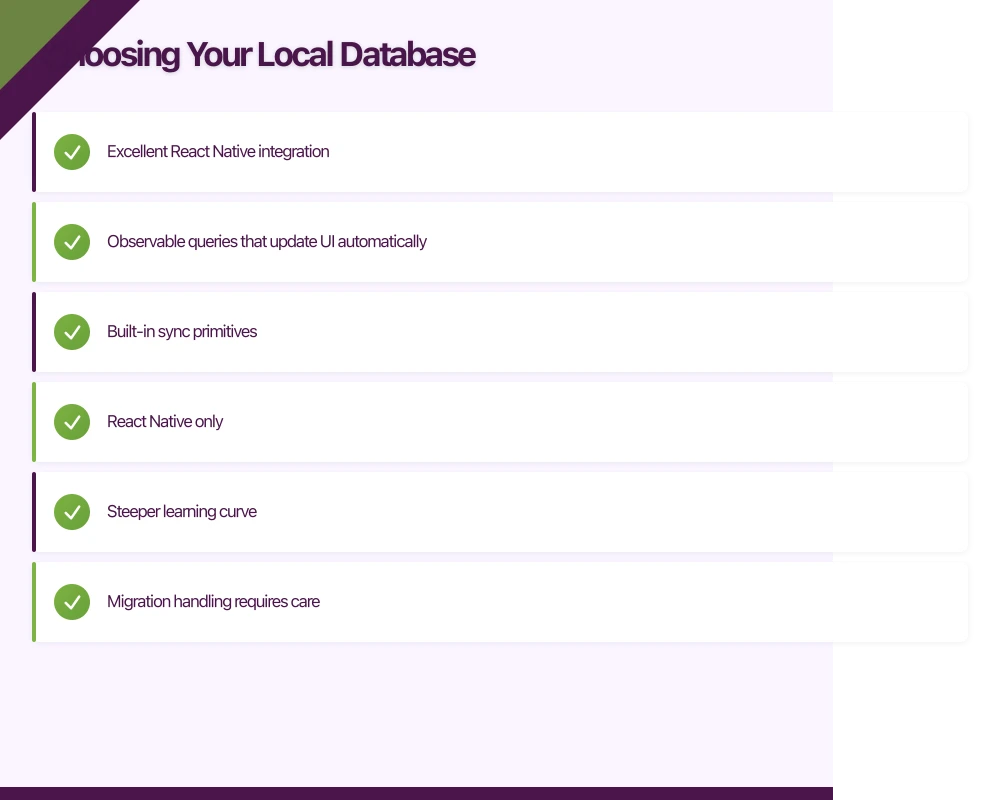
- Excellent React Native integration
- Observable queries that update UI automatically
- Built-in sync primitives
Cons:
- React Native only
- Steeper learning curve
- Migration handling requires care
Realm: Cross-Platform Option
Realm is a mature mobile database from MongoDB. It works on iOS, Android, and React Native with native performance.
Pros:
- Real-time sync with MongoDB Atlas
- Strong typing and schema validation
- Cross-platform consistency
Cons:
- Vendor lock-in concerns with Atlas sync
- Larger binary size
- Complex conflict resolution
SQLite: The Reliable Classic
SQLite is the most widely deployed database in the world. Every mobile OS includes it, and it’s thoroughly battle-tested.
Pros:
- Universal support
- Standard SQL
- Tiny footprint
Cons:
- No built-in sync
- Manual UI updates needed
- More boilerplate code
Implementing Offline-First with WatermelonDB
Let’s
 build a practical example: a field inspection app that works in remote locations.
Setup
# Install WatermelonDB
npm install @nozbe/watermelondb
npm install --save-dev @babel/plugin-proposal-decorators

# For iOS
cd ios && pod install
Define Your Schema
// src/database/schema.js
import { appSchema, tableSchema } from '@nozbe/watermelondb';

export const schema = appSchema({
  version: 1,
  tables: [
    tableSchema({
      name: 'inspections',
      columns: [
        { name: 'site_id', type: 'string', isIndexed: true },
        { name: 'inspector_id', type: 'string' },
        { name: 'status', type: 'string' },
        { name: 'notes', type: 'string' },
        { name: 'completed_at', type: 'number', isOptional: true },
        { name: 'synced_at', type: 'number', isOptional: true },
        { name: 'created_at', type: 'number' },
        { name: 'updated_at', type: 'number' },
      ],
    }),
    tableSchema({
      name: 'inspection_items',
      columns: [
        { name: 'inspection_id', type: 'string', isIndexed: true },
        { name: 'item_type', type: 'string' },
        { name: 'passed', type: 'boolean' },
        { name: 'notes', type: 'string', isOptional: true },
        { name: 'photo_uri', type: 'string', isOptional: true },
      ],
    }),
    tableSchema({
      name: 'sites',
      columns: [
        { name: 'name', type: 'string' },
        { name: 'address', type: 'string' },
        { name: 'latitude', type: 'number' },
        { name: 'longitude', type: 'number' },
      ],
    }),
  ],
});
Create Models
// src/database/models/Inspection.js
import { Model } from '@nozbe/watermelondb';
import { field, date, children, writer } from '@nozbe/watermelondb/decorators';

export class Inspection extends Model {
  static table = 'inspections';

  static associations = {
    inspection_items: { type: 'has_many', foreignKey: 'inspection_id' },
  };

  @field('site_id') siteId;
  @field('inspector_id') inspectorId;
  @field('status') status;
  @field('notes') notes;
  @date('completed_at') completedAt;
  @date('synced_at') syncedAt;
  @date('created_at') createdAt;
  @date('updated_at') updatedAt;

  @children('inspection_items') items;

  // Check if this record needs syncing
  get needsSync() {
    return !this.syncedAt || this.updatedAt > this.syncedAt;
  }

  @writer async complete() {
    await this.update(inspection => {
      inspection.status = 'completed';
      inspection.completedAt = new Date();
    });
  }

  @writer async markSynced() {
    await this.update(inspection => {
      inspection.syncedAt = new Date();
    });
  }
}
Initialize Database
// src/database/index.js
import { Database } from '@nozbe/watermelondb';
import SQLiteAdapter from '@nozbe/watermelondb/adapters/sqlite';

import { schema } from './schema';
import { Inspection } from './models/Inspection';
import { InspectionItem } from './models/InspectionItem';
import { Site } from './models/Site';

const adapter = new SQLiteAdapter({
  schema,
  dbName: 'fieldapp',
  // Enable WAL mode for better performance
  jsi: true,
  onSetUpError: error => {
    console.error('Database setup failed:', error);
  },
});

export const database = new Database({
  adapter,
  modelClasses: [Inspection, InspectionItem, Site],
});
Use in Components
// src/screens/InspectionList.js
import React from 'react';
import { FlatList, View, Text, TouchableOpacity } from 'react-native';
import { withDatabase, withObservables } from '@nozbe/watermelondb/react';
import { Q } from '@nozbe/watermelondb';

function InspectionList({ inspections, onSelect }) {
  return (
    <FlatList
      data={inspections}
      keyExtractor={item => item.id}
      renderItem={({ item }) => (
        <TouchableOpacity onPress={() => onSelect(item)}>
          <View style={styles.item}>
            <Text style={styles.title}>Site: {item.siteId}</Text>
            <Text style={styles.status}>{item.status}</Text>
            {item.needsSync && (
              <View style={styles.syncBadge}>
                <Text>Pending sync</Text>
              </View>
            )}
          </View>
        </TouchableOpacity>
      )}
    />
  );
}

// Connect to database - list updates automatically when data changes
const enhance = withObservables([], ({ database }) => ({
  inspections: database.collections
    .get('inspections')
    .query(Q.sortBy('created_at', Q.desc))
    .observe(),
}));

export default withDatabase(enhance(InspectionList));
Building the Sync Engine
The sync engine handles bidirectional data transfer between local and remote databases.
Sync Strategy
// src/sync/SyncEngine.js
import { synchronize } from '@nozbe/watermelondb/sync';
import { database } from '../database';
import NetInfo from '@react-native-community/netinfo';

class SyncEngine {
  isSyncing = false;
  listeners = new Set();

  constructor() {
    // Auto-sync when network returns
    NetInfo.addEventListener(state => {
      if (state.isConnected && !this.isSyncing) {
        this.sync();
      }
    });
  }

  async sync() {
    if (this.isSyncing) return;

    const netState = await NetInfo.fetch();
    if (!netState.isConnected) {
      console.log('No network - skipping sync');
      return;
    }

    this.isSyncing = true;
    this.notifyListeners('started');

    try {
      await synchronize({
        database,
        pullChanges: async ({ lastPulledAt }) => {
          const response = await fetch(
            `https://api.example.com/sync?last_pulled_at=${lastPulledAt || 0}`,
            {
              headers: {
                Authorization: `Bearer ${await getAuthToken()}`,
              },
            }
          );

          if (!response.ok) {
            throw new Error('Pull failed');
          }

          const { changes, timestamp } = await response.json();
          return { changes, timestamp };
        },

        pushChanges: async ({ changes, lastPulledAt }) => {
          const response = await fetch('https://api.example.com/sync', {
            method: 'POST',
            headers: {
              'Content-Type': 'application/json',
              Authorization: `Bearer ${await getAuthToken()}`,
            },
            body: JSON.stringify({
              changes,
              lastPulledAt,
            }),
          });

          if (!response.ok) {
            throw new Error('Push failed');
          }
        },

        migrationsEnabledAtVersion: 1,
      });

      this.notifyListeners('completed');
    } catch (error) {
      console.error('Sync failed:', error);
      this.notifyListeners('failed', error);
    } finally {
      this.isSyncing = false;
    }
  }

  subscribe(listener) {
    this.listeners.add(listener);
    return () => this.listeners.delete(listener);
  }

  notifyListeners(status, error) {
    this.listeners.forEach(listener => listener(status, error));
  }
}

export const syncEngine = new SyncEngine();
Server-Side Sync Endpoint
// Backend: sync.controller.js (Node.js/Express)
import { db } from '../database';

export async function handleSync(req, res) {
  const userId = req.user.id;
  const { changes, lastPulledAt } = req.body;

  // Process incoming changes
  if (changes) {
    await processIncomingChanges(userId, changes);
  }

  // Get changes since last pull
  const serverChanges = await getChangesSince(userId, lastPulledAt || 0);

  res.json({
    changes: serverChanges,
    timestamp: Date.now(),
  });
}

async function processIncomingChanges(userId, changes) {
  const { inspections, inspection_items, sites } = changes;

  // Handle creates
  for (const record of inspections?.created || []) {
    await db.inspections.upsert({
      ...record,
      user_id: userId,
      server_updated_at: Date.now(),
    });
  }

  // Handle updates
  for (const record of inspections?.updated || []) {
    const existing = await db.inspections.findById(record.id);

    // Conflict resolution: last-write-wins
    if (!existing || record.updated_at > existing.client_updated_at) {
      await db.inspections.update(record.id, {
        ...record,
        server_updated_at: Date.now(),
      });
    }
  }

  // Handle deletes
  for (const id of inspections?.deleted || []) {
    await db.inspections.softDelete(id);
  }
}

async function getChangesSince(userId, timestamp) {
  const inspections = await db.inspections.findModifiedSince(userId, timestamp);
  const items = await db.inspection_items.findModifiedSince(userId, timestamp);
  const sites = await db.sites.findModifiedSince(userId, timestamp);

  return {
    inspections: formatForSync(inspections),
    inspection_items: formatForSync(items),
    sites: formatForSync(sites),
  };
}
Handling Conflicts
Conflicts happen when the same record is modified on multiple devices before sync. You need a strategy.
Last-Write-Wins
Simplest approach: most recent update wins.
function resolveConflict(local, remote) {
  if (remote.updatedAt > local.updatedAt) {
    return remote;
  }
  return local;
}
Good for: Most fields where overwrites are acceptable Bad for: Collaborative editing, counter fields
Field-Level Merge
Compare individual fields and keep the most recent value for each.
function fieldLevelMerge(local, remote, base) {
  const merged = { ...base };

  for (const field of Object.keys(local)) {
    const localChanged = local[field] !== base[field];
    const remoteChanged = remote[field] !== base[field];

    if (localChanged && !remoteChanged) {
      merged[field] = local[field];
    } else if (!localChanged && remoteChanged) {
      merged[field] = remote[field];
    } else if (localChanged && remoteChanged) {
      // Both changed - use timestamp
      merged[field] = local.updatedAt > remote.updatedAt
        ? local[field]
        : remote[field];
    }
  }

  return merged;
}
Custom Resolution for Specific Fields
Some fields need special handling:
function resolveInspectionConflict(local, remote) {
  const merged = { ...remote };

  // Status: prefer "completed" over "draft"
  if (local.status === 'completed' || remote.status === 'completed') {
    merged.status = 'completed';
    merged.completedAt = local.completedAt || remote.completedAt;
  }

  // Notes: concatenate if both changed
  if (local.notes !== remote.notes) {
    if (local.notes && remote.notes) {
      merged.notes = `${remote.notes}\n\n---\n\n${local.notes}`;
    } else {
      merged.notes = local.notes || remote.notes;
    }
  }

  return merged;
}
Network State Management
Show users what’s happening with their data.
// src/components/SyncStatus.js
import React, { useState, useEffect } from 'react';
import { View, Text, TouchableOpacity } from 'react-native';
import NetInfo from '@react-native-community/netinfo';
import { syncEngine } from '../sync/SyncEngine';

export function SyncStatus() {
  const [isOnline, setIsOnline] = useState(true);
  const [syncState, setSyncState] = useState('idle');
  const [pendingCount, setPendingCount] = useState(0);

  useEffect(() => {
    const unsubscribeNet = NetInfo.addEventListener(state => {
      setIsOnline(state.isConnected);
    });

    const unsubscribeSync = syncEngine.subscribe((status) => {
      setSyncState(status);
    });

    return () => {
      unsubscribeNet();
      unsubscribeSync();
    };
  }, []);

  useEffect(() => {
    // Count pending changes
    const countPending = async () => {
      const count = await database.collections
        .get('inspections')
        .query(Q.where('synced_at', Q.eq(null)))
        .fetchCount();
      setPendingCount(count);
    };

    countPending();
    const interval = setInterval(countPending, 5000);
    return () => clearInterval(interval);
  }, []);

  return (
    <View style={styles.container}>
      <View style={[styles.dot, isOnline ? styles.online : styles.offline]} />
      <Text style={styles.text}>
        {isOnline ? 'Online' : 'Offline'}
        {pendingCount > 0 && ` - ${pendingCount} pending`}
      </Text>
      {isOnline && pendingCount > 0 && (
        <TouchableOpacity onPress={() => syncEngine.sync()}>
          <Text style={styles.syncButton}>Sync now</Text>
        </TouchableOpacity>
      )}
    </View>
  );
}
Handling Large Files Offline
Inspection photos need special handling—you can’t sync multi-megabyte images like regular data.
// src/services/PhotoSync.js
import RNFS from 'react-native-fs';
import { database } from '../database';

class PhotoSync {
  async queuePhoto(localUri, inspectionItemId) {
    // Copy to app's documents directory
    const filename = `photo_${Date.now()}.jpg`;
    const permanentUri = `${RNFS.DocumentDirectoryPath}/${filename}`;

    await RNFS.copyFile(localUri, permanentUri);

    // Update record with local URI
    const item = await database.collections
      .get('inspection_items')
      .find(inspectionItemId);

    await item.update(record => {
      record.photoUri = permanentUri;
      record.photoSynced = false;
    });
  }

  async syncPhotos() {
    const items = await database.collections
      .get('inspection_items')
      .query(
        Q.where('photo_uri', Q.notEq(null)),
        Q.where('photo_synced', Q.eq(false))
      )
      .fetch();

    for (const item of items) {
      try {
        const remoteUrl = await this.uploadPhoto(item.photoUri);

        await item.update(record => {
          record.remotePhotoUrl = remoteUrl;
          record.photoSynced = true;
        });
      } catch (error) {
        console.log(`Photo upload failed for ${item.id}, will retry`);
      }
    }
  }

  async uploadPhoto(localUri) {
    const formData = new FormData();
    formData.append('photo', {
      uri: localUri,
      type: 'image/jpeg',
      name: 'photo.jpg',
    });

    const response = await fetch('https://api.example.com/photos', {
      method: 'POST',
      headers: {
        'Content-Type': 'multipart/form-data',
        Authorization: `Bearer ${await getAuthToken()}`,
      },
      body: formData,
    });

    const { url } = await response.json();
    return url;
  }
}

export const photoSync = new PhotoSync();
Testing Offline Behavior
Test your app actually works offline:
// e2e/offline.test.js
describe('Offline functionality', () => {
  beforeEach(async () => {
    await device.launchApp();
    await device.disableSynchronization();
  });

  it('should create inspection while offline', async () => {
    // Simulate offline mode
    await device.setURLBlacklist(['.*api.example.com.*']);

    // Create inspection
    await element(by.id('new-inspection-button')).tap();
    await element(by.id('site-selector')).tap();
    await element(by.text('Site A')).tap();
    await element(by.id('start-inspection-button')).tap();

    // Verify it's saved locally
    await expect(element(by.id('inspection-list'))).toBeVisible();
    await expect(element(by.text('Site A'))).toBeVisible();
    await expect(element(by.text('Pending sync'))).toBeVisible();

    // Restore network
    await device.setURLBlacklist([]);

    // Trigger sync
    await element(by.id('sync-button')).tap();

    // Verify sync completed
    await waitFor(element(by.text('Pending sync')))
      .not.toBeVisible()
      .withTimeout(10000);
  });
});
Conclusion
Offline-first architecture is essential for Australian mobile apps. Users in rural areas, on public transport, or in buildings with poor reception need apps that keep working regardless of connectivity.
The key principles:
- Local database is the source of truth — all operations hit local storage first
- Sync is opportunistic — happens when network is available, not required for core functionality
- Conflicts are expected — design your resolution strategy before they happen
- User feedback matters — show sync status so users know what’s happening with their data
WatermelonDB makes this straightforward for React Native apps. The investment in offline-first pays off in happier users who can actually use your app wherever they are.
How does your app strategy fit into long-term digital transformation? Ash Ganda writes about the frameworks that connect mobile innovation to business outcomes.
Awesome Apps is the mobile development division of Ganda Tech Services, building iOS and Android apps for Australian businesses.
Talk to a Sydney app developer — free.
30 minutes. We'll tell you what your app needs, how long it takes, and what it costs. Real answers, no sales pitch.
Book Free App Strategy Call →Free · 30 minutes · No obligation