Introduction
Deep linking enables URLs to open specific content within your mobile app rather than a web page. When a user taps a link to your product page, they land directly in your app’s product screen, authenticated and ready to buy.
This capability transforms mobile marketing. Email campaigns, social media posts, and QR codes all become direct pathways into your app. Without deep linking, users land on your website and must find and open your app manually, losing most of them along the way.
This guide covers implementing deep linking on both iOS and Android, including the more reliable Universal Links and App Links that work even when tapped from email or messages where regular URL schemes fail.
Types of Deep Links
URI Scheme Links
The original deep linking approach using custom URL schemes:
yourapp://product/123
yourapp://user/profile
myapp://checkout?cart=abc123
Advantages:
- Simple to implement
- Works across all platforms
- No server configuration needed
Limitations:
- Not unique (any app can claim any scheme)
- Fails in many contexts (email clients, Safari)
- No fallback if app not installed
- Security concerns (no verification)
Universal Links (iOS) and App Links (Android)
Modern deep linking using verified HTTPS URLs:
https://yourapp.com/product/123
https://yourapp.com/user/profile
Advantages:
- Verified ownership (only you can claim your domain)
- Works everywhere including email and messages
- Graceful fallback to website
- More secure
Limitations:
- Requires server configuration
- More complex setup
- Domain verification required
Deferred Deep Links
Handle links when the app is not yet installed:
- User taps link
- User is sent to App Store
- User installs and opens app
- App retrieves original link destination
- User sees intended content
Requires third-party services like Branch, Adjust, or Firebase Dynamic Links.
Implementing Universal Links (iOS)
Step 1:
 Create Apple App Site Association File
Create a file named apple-app-site-association (no extension) on your web server:
{
  "applinks": {
    "apps": [],
    "details": [
      {
        "appIDs": ["TEAM_ID.com.yourcompany.yourapp"],
        "paths": ["/product/*", "/user/*", "/checkout/*"],
        "components": [
          {
            "/": "/product/*",
            "comment": "Product pages"
          },
          {
            "/": "/user/*",
            "comment": "User profiles"
          },
          {
            "/": "/checkout/*",
            "comment": "Checkout flow"
          },
          {
            "/": "/*",
            "exclude": true,
            "comment": "Exclude all other paths"
          }
        ]
      }
    ]
  }
}
Step 2: Host the AASA File
The file must be accessible at:
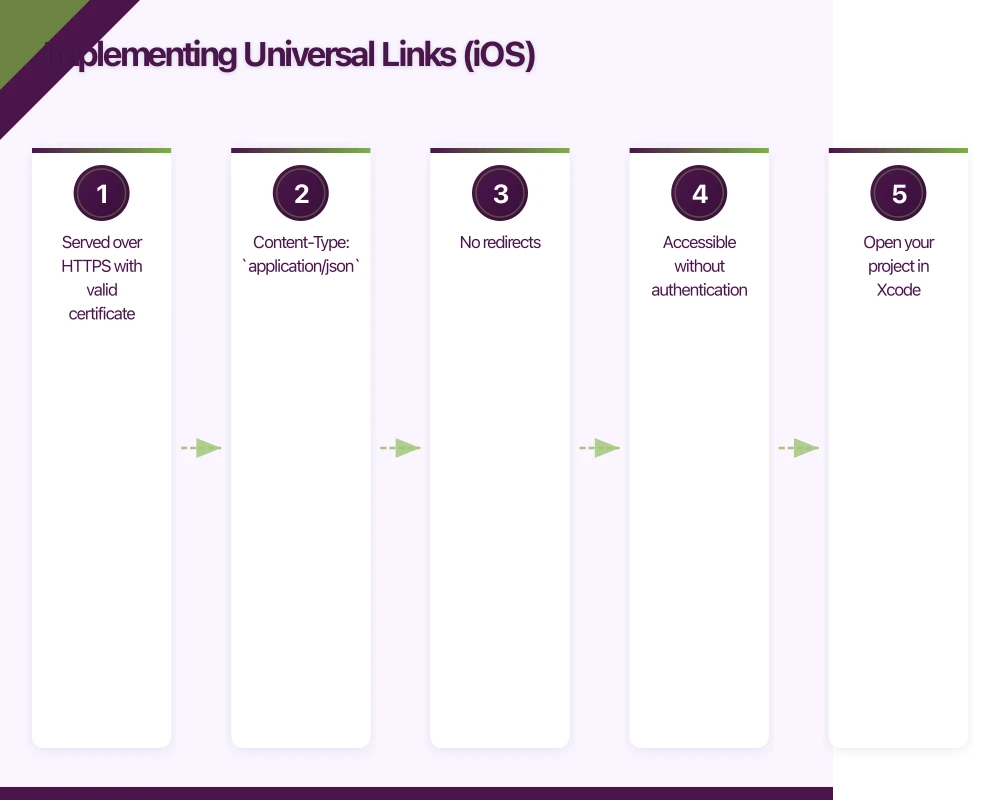
https://yourdomain.com/.well-known/apple-app-site-associationRequirements:
- Served over HTTPS with valid certificate
- Content-Type:
application/json - No redirects
- Accessible without authentication
Nginx configuration:
location /.well-known/apple-app-site-association {
    default_type application/json;
    add_header Cache-Control "max-age=3600";
}
Step 3: Enable Associated Domains in Xcode
- Open your project in Xcode
- Select your target
- Go to Signing & Capabilities
- Click + Capability and add Associated Domains
- Add your domain:
applinks:yourdomain.com
Step 4: Handle Incoming Links
For React Native with React Navigation:
// App.tsx
import { NavigationContainer } from '@react-navigation/native';
import { Linking } from 'react-native';

const linking = {
  prefixes: ['https://yourdomain.com', 'yourapp://'],
  config: {
    screens: {
      Home: '',
      Product: 'product/:id',
      UserProfile: 'user/:username',
      Checkout: 'checkout',
      Settings: 'settings'
    }
  }
};

function App() {
  return (
    <NavigationContainer linking={linking} fallback={<LoadingScreen />}>
      <AppNavigator />
    </NavigationContainer>
  );
}
For native iOS (AppDelegate.swift):
// AppDelegate.swift
import UIKit

class AppDelegate: UIResponder, UIApplicationDelegate {

    func application(
        _ application: UIApplication,
        continue userActivity: NSUserActivity,
        restorationHandler: @escaping ([UIUserActivityRestoring]?) -> Void
    ) -> Bool {
        guard userActivity.activityType == NSUserActivityTypeBrowsingWeb,
              let url = userActivity.webpageURL else {
            return false
        }

        // Handle the URL
        return handleDeepLink(url: url)
    }

    private func handleDeepLink(url: URL) -> Bool {
        let pathComponents = url.pathComponents

        if pathComponents.count >= 2 {
            switch pathComponents[1] {
            case "product":
                if pathComponents.count >= 3 {
                    let productId = pathComponents[2]
                    navigateToProduct(id: productId)
                    return true
                }
            case "user":
                if pathComponents.count >= 3 {
                    let username = pathComponents[2]
                    navigateToUserProfile(username: username)
                    return true
                }
            default:
                break
            }
        }

        return false
    }
}
Implementing App Links (Android)
Step 1: Create Digital Asset Links File
Create assetlinks.json on your server:
[
  {
    "relation": ["delegate_permission/common.handle_all_urls"],
    "target": {
      "namespace": "android_app",
      "package_name": "com.yourcompany.yourapp",
      "sha256_cert_fingerprints": [
        "14:6D:E9:83:C5:73:06:50:D8:EE:B9:95:2F:34:FC:64:16:A0:83:42:E6:1D:BE:A8:8A:04:96:B2:3F:CF:44:E5"
      ]
    }
  }
]
Get your SHA256 fingerprint:
# For debug keystore
keytool -list -v -keystore ~/.android/debug.keystore -alias androiddebugkey -storepass android -keypass android

# For release keystore
keytool -list -v -keystore your-release-key.keystore -alias your-alias
Step 2: Host the Asset Links File
The file must be at:
https://yourdomain.com/.well-known/assetlinks.jsonStep 3: Configure Android Manifest
{/* android/app/src/main/AndroidManifest.xml */}
<manifest>
    <application>
        <activity
            android:name=".MainActivity"
            android:launchMode="singleTask">

            {/* App Links */}
            <intent-filter android:autoVerify="true">
                <action android:name="android.intent.action.VIEW" />
                <category android:name="android.intent.category.DEFAULT" />
                <category android:name="android.intent.category.BROWSABLE" />
                <data
                    android:scheme="https"
                    android:host="yourdomain.com"
                    android:pathPrefix="/product" />
                <data
                    android:scheme="https"
                    android:host="yourdomain.com"
                    android:pathPrefix="/user" />
            </intent-filter>

            {/* URI Scheme (fallback) */}
            <intent-filter>
                <action android:name="android.intent.action.VIEW" />
                <category android:name="android.intent.category.DEFAULT" />
                <category android:name="android.intent.category.BROWSABLE" />
                <data android:scheme="yourapp" />
            </intent-filter>
        </activity>
    </application>
</manifest>
Step 4: Handle Incoming Links
For React Native, the linking configuration handles this automatically. For native Android:
// MainActivity.kt
class MainActivity : AppCompatActivity() {

    override fun onCreate(savedInstanceState: Bundle?) {
        super.onCreate(savedInstanceState)
        handleIntent(intent)
    }

    override fun onNewIntent(intent: Intent?) {
        super.onNewIntent(intent)
        intent?.let { handleIntent(it) }
    }

    private fun handleIntent(intent: Intent) {
        val action = intent.action
        val data = intent.data

        if (Intent.ACTION_VIEW == action && data != null) {
            handleDeepLink(data)
        }
    }

    private fun handleDeepLink(uri: Uri) {
        val pathSegments = uri.pathSegments

        when {
            pathSegments.size >= 2 && pathSegments[0] == "product" -> {
                val productId = pathSegments[1]
                navigateToProduct(productId)
            }
            pathSegments.size >= 2 && pathSegments[0] == "user" -> {
                val username = pathSegments[1]
                navigateToUserProfile(username)
            }
        }
    }
}
React Native Deep Linking Setup
Complete Linking Configuration
// navigation/linking.ts
import { LinkingOptions } from '@react-navigation/native';
import { Linking } from 'react-native';
import AsyncStorage from '@react-native-async-storage/async-storage';

export const linking: LinkingOptions<RootStackParamList> = {
  prefixes: [
    'https://yourdomain.com',
    'https://www.yourdomain.com',
    'yourapp://'
  ],

  config: {
    screens: {
      // Tab Navigator
      MainTabs: {
        screens: {
          HomeTab: {
            screens: {
              Home: '',
              ProductList: 'products',
              ProductDetail: 'product/:id'
            }
          },
          SearchTab: {
            screens: {
              Search: 'search',
              SearchResults: 'search/:query'
            }
          },
          ProfileTab: {
            screens: {
              Profile: 'profile',
              Settings: 'settings'
            }
          }
        }
      },
      // Modal screens
      Checkout: 'checkout',
      Auth: 'auth',
      // Deep-linked screens
      UserProfile: 'user/:username',
      Order: 'order/:orderId',
      // Catch-all
      NotFound: '*'
    }
  },

  async getInitialURL() {
    // Check for deferred deep link
    const savedDeepLink = await AsyncStorage.getItem('deferred_deep_link');
    if (savedDeepLink) {
      await AsyncStorage.removeItem('deferred_deep_link');
      return savedDeepLink;
    }

    // Check for initial URL
    const url = await Linking.getInitialURL();
    return url;
  },

  subscribe(listener) {
    const subscription = Linking.addEventListener('url', ({ url }) => {
      listener(url);
    });

    return () => {
      subscription.remove();
    };
  }
};
Handling Authentication
Often deep links require authentication:
// navigation/DeepLinkHandler.tsx
import React, { useEffect, useState } from 'react';
import { Linking } from 'react-native';
import AsyncStorage from '@react-native-async-storage/async-storage';
import { useNavigation } from '@react-navigation/native';
import { useAuth } from '../hooks/useAuth';

export function DeepLinkHandler({ children }) {
  const { isAuthenticated, isLoading } = useAuth();
  const navigation = useNavigation();
  const [pendingDeepLink, setPendingDeepLink] = useState<string | null>(null);

  useEffect(() => {
    const handleDeepLink = async (url: string) => {
      // Parse the URL
      const parsed = parseDeepLink(url);

      // Check if authentication is required
      if (requiresAuth(parsed.path) && !isAuthenticated) {
        // Save deep link for after authentication
        await AsyncStorage.setItem('pending_deep_link', url);
        navigation.navigate('Auth', { returnUrl: url });
        return;
      }

      // Navigate directly
      navigateToDeepLink(navigation, parsed);
    };

    const subscription = Linking.addEventListener('url', ({ url }) => {
      handleDeepLink(url);
    });

    // Check for initial URL
    Linking.getInitialURL().then((url) => {
      if (url) handleDeepLink(url);
    });

    return () => subscription.remove();
  }, [isAuthenticated]);

  // After authentication, check for pending deep link
  useEffect(() => {
    if (isAuthenticated && !isLoading) {
      AsyncStorage.getItem('pending_deep_link').then((url) => {
        if (url) {
          AsyncStorage.removeItem('pending_deep_link');
          const parsed = parseDeepLink(url);
          navigateToDeepLink(navigation, parsed);
        }
      });
    }
  }, [isAuthenticated, isLoading]);

  return <>{children}</>;
}

function requiresAuth(path: string): boolean {
  const protectedPaths = ['/checkout', '/order', '/profile/settings'];
  return protectedPaths.some((p) => path.startsWith(p));
}

function parseDeepLink(url: string) {
  const parsed = new URL(url);
  return {
    path: parsed.pathname,
    params: Object.fromEntries(parsed.searchParams),
    hash: parsed.hash
  };
}

function navigateToDeepLink(navigation, { path, params }) {
  const segments = path.split('/').filter(Boolean);

  switch (segments[0]) {
    case 'product':
      navigation.navigate('ProductDetail', { id: segments[1], ...params });
      break;
    case 'user':
      navigation.navigate('UserProfile', { username: segments[1] });
      break;
    case 'order':
      navigation.navigate('Order', { orderId: segments[1] });
      break;
    default:
      navigation.navigate('Home');
  }
}
Deferred Deep Linking
For users who do not have the app installed:
Option 1: Firebase Dynamic Links
// services/dynamicLinks.ts
import dynamicLinks from '@react-native-firebase/dynamic-links';

async function createDynamicLink(path: string): Promise<string> {
  const link = await dynamicLinks().buildShortLink({
    link: `https://yourdomain.com${path}`,
    domainUriPrefix: 'https://yourapp.page.link',
    ios: {
      bundleId: 'com.yourcompany.yourapp',
      appStoreId: '1234567890',
      fallbackUrl: `https://yourdomain.com${path}`
    },
    android: {
      packageName: 'com.yourcompany.yourapp',
      fallbackUrl: `https://yourdomain.com${path}`
    },
    social: {
      title: 'Check this out',
      descriptionText: 'Open in our app',
      imageUrl: 'https://yourdomain.com/og-image.png'
    }
  });

  return link;
}

// Handle incoming dynamic links
function useDynamicLinks() {
  const navigation = useNavigation();

  useEffect(() => {
    // Handle link when app is opened from terminated state
    dynamicLinks()
      .getInitialLink()
      .then((link) => {
        if (link) {
          handleDeepLink(link.url);
        }
      });

    // Handle link when app is in background
    const unsubscribe = dynamicLinks().onLink((link) => {
      handleDeepLink(link.url);
    });

    return () => unsubscribe();
  }, []);
}
Option 2: Branch.io
// services/branch.ts
import branch from 'react-native-branch';

// Initialize Branch
branch.subscribe(({ error, params, uri }) => {
  if (error) {
    console.error('Branch error:', error);
    return;
  }

  if (params['+clicked_branch_link']) {
    // Handle deep link params
    const productId = params.productId;
    const userId = params.userId;

    if (productId) {
      navigation.navigate('ProductDetail', { id: productId });
    } else if (userId) {
      navigation.navigate('UserProfile', { id: userId });
    }
  }
});

// Create a Branch link
async function createBranchLink(data: object): Promise<string> {
  const branchUniversalObject = await branch.createBranchUniversalObject(
    'product/123',
    {
      title: 'Product Name',
      contentDescription: 'Check out this product',
      contentImageUrl: 'https://example.com/product.jpg',
      contentMetadata: {
        customMetadata: data
      }
    }
  );

  const { url } = await branchUniversalObject.generateShortUrl({
    feature: 'sharing',
    channel: 'app'
  });

  return url;
}
Testing Deep Links
Testing on iOS Simulator
# URI scheme
xcrun simctl openurl booted "yourapp://product/123"

# Universal Links (requires built app)
xcrun simctl openurl booted "https://yourdomain.com/product/123"
Testing on Android Emulator
# URI scheme
adb shell am start -a android.intent.action.VIEW -d "yourapp://product/123"

# App Links
adb shell am start -a android.intent.action.VIEW -d "https://yourdomain.com/product/123"
Verifying Server Configuration
# Check Apple App Site Association
curl -I https://yourdomain.com/.well-known/apple-app-site-association

# Validate AASA content
curl https://yourdomain.com/.well-known/apple-app-site-association | jq .

# Check Android Asset Links
curl https://yourdomain.com/.well-known/assetlinks.json | jq .

# Use Google's verification tool
# https://developers.google.com/digital-asset-links/tools/generator
Debug Mode
// Add debug logging
useEffect(() => {
  if (__DEV__) {
    Linking.addEventListener('url', ({ url }) => {
      console.log('Deep link received:', url);
    });

    Linking.getInitialURL().then((url) => {
      console.log('Initial URL:', url);
    });
  }
}, []);
Analytics and Attribution
Track deep link performance:
// analytics/deepLinkTracking.ts
import analytics from '@react-native-firebase/analytics';

export async function trackDeepLink(url: string, source: string) {
  const parsed = new URL(url);

  await analytics().logEvent('deep_link_opened', {
    path: parsed.pathname,
    source,
    campaign: parsed.searchParams.get('utm_campaign'),
    medium: parsed.searchParams.get('utm_medium'),
    content: parsed.searchParams.get('utm_content')
  });
}

// Use in deep link handler
function handleDeepLink(url: string, source: 'universal_link' | 'uri_scheme' | 'deferred') {
  trackDeepLink(url, source);

  // Continue with navigation...
}
Common Issues and Solutions
Universal Links Not Working
- AASA file not accessible: Check HTTPS, no redirects, correct Content-Type
- App not installed from App Store: Universal Links require the app to be downloaded from App Store (TestFlight counts)
- Domain not in Associated Domains: Verify Xcode capability configuration
- Apple CDN caching: AASA is cached; updates can take up to 24 hours
App Links Not Verified
- Fingerprint mismatch: Ensure correct SHA256 in assetlinks.json
- Multiple signing keys: Include fingerprints for all keystores (debug, release, Play App Signing)
- autoVerify not set: Check intent-filter in AndroidManifest.xml
Links Opening in Browser
This is expected behaviour in some contexts:
- Links typed directly in Safari address bar
- Links from JavaScript redirects
- Users who previously chose “Open in Safari”
Workaround: Use a smart banner or interstitial page that offers to open the app.
Best Practices
- Always provide web fallback: Users without the app should see content on your website
- Handle missing routes: Display a friendly “not found” screen rather than crashing
- Preserve state: Save pending deep links during authentication
- Test all paths: Automated tests for every deep-linkable route
- Monitor link verification: Set up alerts for AASA/assetlinks.json availability
- Use UTM parameters: Track marketing campaign effectiveness
- Short links for sharing: Long URLs with query params are ugly in messages
Conclusion
Deep linking is essential infrastructure for mobile app growth. Without it, every marketing link requires users to manually find content in your app, and most will not bother.
Start with Universal Links and App Links for your primary marketing URLs. Add URI scheme support as a fallback for edge cases. Consider deferred deep linking if user acquisition is a priority and you need to maintain context through the install process.
The setup is moderately complex, especially the server-side configuration. But once working, deep links enable marketing, sharing, and re-engagement patterns that are impossible without them.
Test thoroughly across devices, OS versions, and link contexts. Deep linking has many edge cases that only appear in specific scenarios. Automated testing catches regressions before they impact users.
Need help implementing deep linking for your mobile app? Our team has set up deep linking for apps handling millions of users. Contact us to discuss your requirements.
For insights on building a technology strategy where mobile, web, and cloud work together, visit Ash Ganda’s blog.
This article is brought to you by Ganda Tech Services — Sydney’s complete digital solutions provider covering cloud, web, and mobile.
Talk to a Sydney app developer — free.
30 minutes. We'll tell you what your app needs, how long it takes, and what it costs. Real answers, no sales pitch.
Book Free App Strategy Call →Free · 30 minutes · No obligation