React Native New Architecture: Fabric and TurboModules
React Native’s New Architecture has been in development for years, and with the 0.71 release earlier this year, it is finally production-ready. This is the most significant change to React Native since its inception, replacing the bridge-based communication model with a fundamentally faster approach.
If you are building or maintaining React Native apps, understanding the New Architecture is no longer optional. It changes how your app renders UI, communicates with native modules, and performs under load. Let us break down what has changed, why it matters, and how to adopt it.
The Problem with the Old Architecture
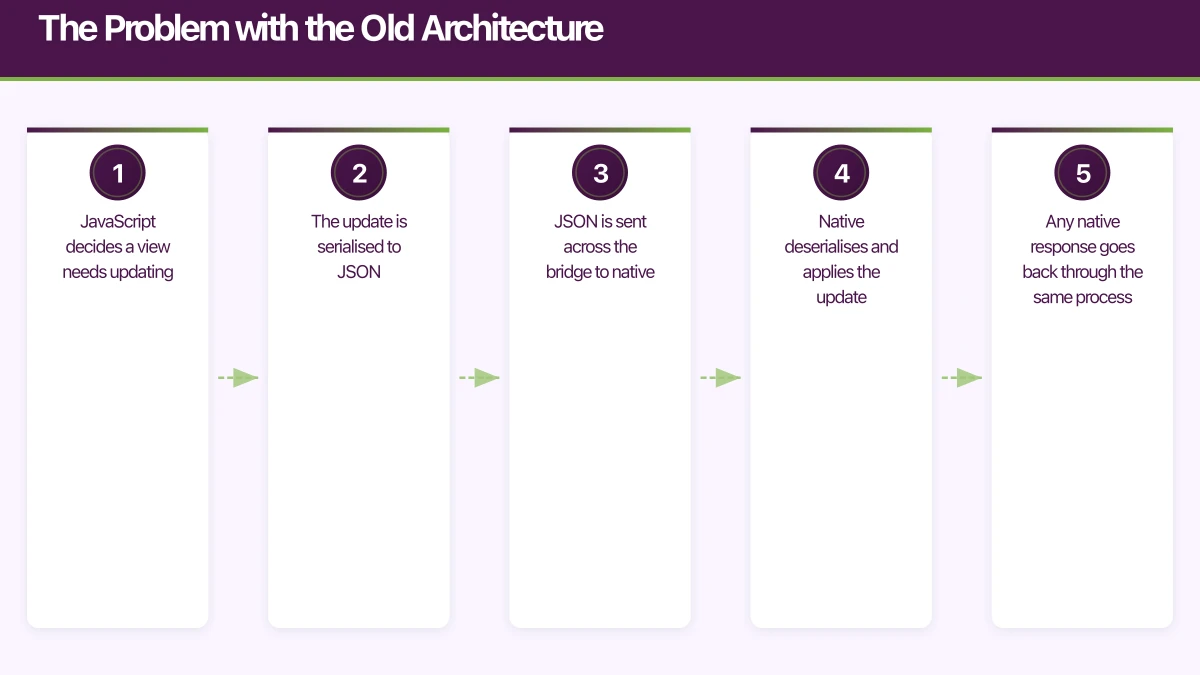
React Native’s original architecture relied on a “bridge” — a JSON serialisation layer that passed messages between JavaScript and native code asynchronously. Every interaction crossed this bridge:
- JavaScript decides a view needs updating
- The update is serialised to JSON
- JSON is sent across the bridge to native
- Native deserialises and applies the update
- Any native response goes back through the same process
This architecture worked, but it introduced unavoidable latency. The bridge was single-threaded, meaning all communication — UI updates, native module calls, event handling — queued through one bottleneck. Complex gestures, large list scrolling, and rapid state changes all suffered because the bridge could not keep up.
The New Architecture
 : Three Pillars
The New Architecture replaces the bridge with three interconnected systems:
1. JavaScript Interface (JSI)
JSI is the foundation. Instead of serialising data to JSON and passing it across a bridge, JSI allows JavaScript to hold direct references to C++ objects and call methods on them synchronously. This eliminates serialisation overhead entirely.
Think of it this way: the old bridge was like sending letters between two offices. JSI is like putting both teams in the same room.
// C++ host object exposed to JavaScript via JSI
class NativeDatabase : public jsi::HostObject {
public:
    jsi::Value get(jsi::Runtime& runtime, const jsi::PropNameID& name) override {
        auto methodName = name.utf8(runtime);

        if (methodName == "query") {
            return jsi::Function::createFromHostFunction(
                runtime,
                name,
                1,
                [](jsi::Runtime& rt,
                   const jsi::Value& thisVal,
                   const jsi::Value* args,
                   size_t count) -> jsi::Value {
                    // Direct synchronous call - no bridge!
                    auto sql = args[0].asString(rt).utf8(rt);
                    auto result = executeQuery(sql);
                    return convertToJSI(rt, result);
                }
            );
        }
        return jsi::Value::undefined();
    }
};
2. Fabric Renderer
Fabric is the new rendering system that replaces the old UI Manager. Built on JSI, it enables:
Synchronous layout measurement. The old architecture required asynchronous bridge calls to measure native views. Fabric calculates layout synchronously in C++, which means JavaScript knows the exact dimensions of native components immediately.
Concurrent rendering support. Fabric is designed to work with React 18’s concurrent features. It can prepare multiple UI trees simultaneously and commit the right one based on priority. This means high-priority updates (like user input) can interrupt lower-priority updates (like fetching and rendering a list).
Improved mounting. Fabric creates a shadow tree in C++ that maps directly to native view hierarchies. Updates are diffed and applied more efficiently than the old JSON-based approach.
The practical impact is significant. List scrolling becomes smoother because layout calculations happen synchronously. Screen transitions feel more responsive because high-priority interactions are not blocked by background work. Complex animations maintain 60fps more consistently.
3. TurboModules
TurboModules replace the old Native Modules system. The key improvements:
Lazy loading. Old native modules were all initialised at app startup, regardless of whether they were needed. TurboModules load on first access, reducing startup time for apps with many native dependencies.
Type-safe specifications. TurboModules use codegen to generate type-safe interfaces from JavaScript specifications. This catches type mismatches at build time rather than runtime.
Synchronous access. Through JSI, TurboModules can be called synchronously when needed. This is critical for operations like reading from a database where asynchronous round-trips add unnecessary latency.
Here is how a TurboModule specification looks:
// NativeDeviceInfo.ts
import type { TurboModule } from 'react-native';
import { TurboModuleRegistry } from 'react-native';

export interface Spec extends TurboModule {
  getDeviceModel(): string;
  getBatteryLevel(): Promise<number>;
  getLocale(): string;
  isTablet(): boolean;
}

export default TurboModuleRegistry.getEnforcing<Spec>('DeviceInfo');
The codegen tool reads this specification and generates the native (Objective-C++ and Java) interface code automatically. Your native implementation just needs to conform to the generated interface.
E
nabling the New Architecture
For new projects created with React Native 0.71 or later, the New Architecture can be enabled with a single flag:
# ios/Podfile
use_react_native!(
  :path => config[:reactNativePath],
  :fabric_enabled => true,
  :new_arch_enabled => true
)
// android/gradle.properties
newArchEnabled=trueFor existing projects, the migration requires more work:
iOS Migration Steps
- Update your Podfile to enable Fabric and TurboModules
- Migrate native modules to the TurboModule spec
- Migrate native UI components to Fabric components
- Run
pod installwith the new configuration - Update any native code that references the old bridge APIs
Android Migration Steps
- Enable the New Architecture in
gradle.properties - Update native modules to implement TurboModule interfaces
- Migrate ViewManagers to Fabric components
- Update the
MainApplicationto use the new ReactHost - Clean and rebuild the project
Migrating Na
tive Modules to TurboModules
If you have existing native modules, migration follows a clear pattern. Start by writing the TypeScript specification:
// NativeAnalytics.ts
import type { TurboModule } from 'react-native';
import { TurboModuleRegistry } from 'react-native';

export interface Spec extends TurboModule {
  trackEvent(name: string, properties: Object): void;
  setUserId(userId: string): void;
  flush(): Promise<void>;
}

export default TurboModuleRegistry.getEnforcing<Spec>('Analytics');
Run codegen, then update your native implementation to conform to the generated interface.
For iOS (Objective-C++):
@interface AnalyticsModule : NSObject <NativeAnalyticsSpec>
@end

@implementation AnalyticsModule

RCT_EXPORT_MODULE(Analytics)

- (void)trackEvent:(NSString *)name properties:(NSDictionary *)properties {
    [[AnalyticsService shared] track:name properties:properties];
}

- (void)setUserId:(NSString *)userId {
    [[AnalyticsService shared] identify:userId];
}

- (void)flush:(RCTPromiseResolveBlock)resolve reject:(RCTPromiseRejectBlock)reject {
    [[AnalyticsService shared] flushWithCompletion:^{
        resolve(nil);
    }];
}

- (std::shared_ptr<facebook::react::TurboModule>)getTurboModule:
    (const facebook::react::ObjCTurboModule::InitParams &)params {
    return std::make_shared<facebook::react::NativeAnalyticsSpecJSI>(params);
}

@end
Performance Benchmarks
The performance improvements are measurable and significant:
App startup time typically improves by 10-30% due to TurboModule lazy loading. Apps with many native modules see the largest gains because they no longer pay the initialisation cost for every module at launch.
List scrolling becomes noticeably smoother. The synchronous layout measurement in Fabric eliminates the “blank frame” problem where cells appear empty briefly because the bridge could not deliver layout data fast enough. In our testing, dropped frames during fast scrolling reduced by over 50%.
Interaction responsiveness improves across the board. Touch events no longer compete with background data processing on the bridge. Users feel the difference in gesture-heavy interfaces and form inputs.
Memory usage can decrease because Fabric’s C++ shadow tree is more memory-efficient than the old JavaScript-based shadow tree, particularly for complex view hierarchies.
Library Compatibility
The most significant practical concern with the New Architecture is library compatibility. Not all third-party libraries support Fabric and TurboModules yet. Before migrating, audit your dependencies:
Fully compatible (as of March 2023): React Navigation, React Native Reanimated 3.x, React Native Gesture Handler, React Native Screens, React Native SVG.
Interop mode available: Libraries that have not been updated can often run through an interop layer that bridges old-style modules to the new system. This is not as performant as native support but allows migration without waiting for every dependency.
Check compatibility: The reactnative.directory website tracks New Architecture support for popular libraries.
Should You Migrate Now?
For new projects, enable the New Architecture from day one. There is no reason to start with the old architecture in 2023.
For existing production apps, the decision depends on your dependency landscape and team capacity:
- If all your critical dependencies support the New Architecture, start planning migration
- If key dependencies lack support, wait for updates but begin preparing by writing TurboModule specs for your own native modules
- If you are considering a major refactor anyway, combine it with New Architecture migration
The migration is not trivial, but it is a one-time cost that pays dividends in performance and future-proofing. React Native’s roadmap assumes the New Architecture going forward, and library authors are increasingly prioritising it.
Practical Adoption Strategy
- Audit dependencies for New Architecture compatibility
- Enable interop mode as a first step — this lets you run on the new system without migrating everything
- Migrate your own native modules to TurboModules one at a time
- Test performance at each step to quantify improvements
- Migrate UI components to Fabric as needed
- Disable interop mode once all modules are migrated
The New Architecture is React Native growing up. It addresses the performance concerns that drove teams to native development and positions React Native as a serious option for performance-sensitive applications.
Planning a React Native project or migration? Our team at eawesome builds high-performance React Native apps with the latest architecture patterns.
Drive more app downloads with a professional web presence. Cosmos Web Tech specialises in web design and SEO for Australian tech businesses.
Ashish Ganda is the founder of Ganda Tech Services, a Sydney-based technology consultancy helping Australian businesses grow through cloud, web, and mobile solutions.
Talk to a Sydney app developer — free.
30 minutes. We'll tell you what your app needs, how long it takes, and what it costs. Real answers, no sales pitch.
Book Free App Strategy Call →Free · 30 minutes · No obligation