If you run an Australian business and you have been sitting on an app idea, this year’s two big developer events — Apple’s WWDC in June and Google I/O in May — mattered to you, even if you never watched a single keynote.
Both events were pitched at developers. But underneath the jargon, Apple and Google shipped changes in 2026 that move the three numbers a business owner actually cares about: how much an app costs to build, how long it takes to ship, and what it can realistically do once it is live.
This is not a keynote recap. It is a plain-English translation of what changed this year and how it affects the decision you are trying to make — whether to build, what to build, and what is now possible on a small-business budget that was not possible twelve months ago.
The short version
Three shifts matter most for Australian SMEs in 2026:
- On-device and “free-tier” AI went mainstream. Both platforms now let apps run genuinely useful AI without paying a cloud bill for every user interaction. Apple made its Foundation Models free to most developers; Google shipped a stronger on-device model. Features that would have blown a small budget last year are now feasible.
- AI now helps build the app itself. Apple’s Xcode and Google’s Android Studio both gained AI coding agents in 2026, and Google will even scaffold a working Android app from a prompt. That shows up as faster timelines and fewer billable hours on repetitive work.
- The app stores got more automated. AI-generated store listings, bulk catalogue management, and one-click test releases mean less time (and less invoiced time) spent on the unglamorous parts of shipping and marketing an app.
Let’s break down what actually shipped.
What Apple shipped at WWDC 2026
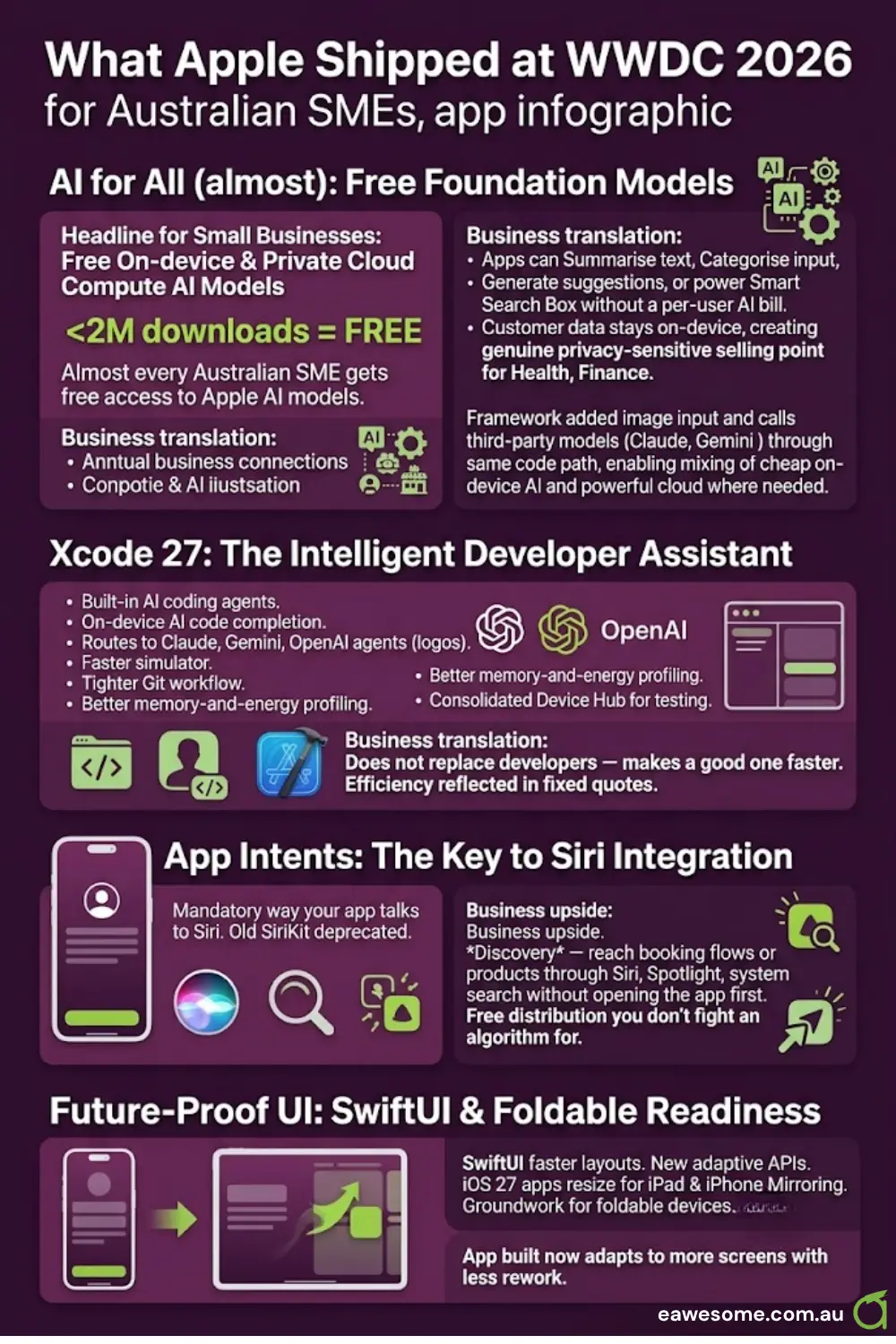
Foundation Models — now free for most developers. The headline for small businesses: Apple made its on-device and Private Cloud Compute AI models free to use for developers with fewer than two million first-time App Store downloads. In plain terms, that is almost every Australian SME. The business translation: an app can summarise text, categorise input, generate suggestions, or power a smart search box without a per-user AI bill — and, for on-device work, without customer data leaving the phone. For anything privacy-sensitive (health, finance, client records), that is a genuine selling point, not just a cost saving. The framework also added image input and the ability to call third-party models like Claude and Gemini through the same code path, so a developer can mix cheap on-device AI with a powerful cloud model only where it is actually needed.
Xcode 27 with built-in AI coding agents. Apple’s development environment now ships on-device AI code completion and can route to Claude, Gemini, or OpenAI coding agents on top of Apple’s own local models. It also got a faster simulator, tighter Git workflow, better memory-and-energy profiling, and a consolidated Device Hub for testing. This does not replace a developer — it makes a good one faster, which is the kind of efficiency a fixed quote can reflect.
App Intents is now the way into Siri. Apple made App Intents the mandatory way your app talks to Siri (the old SiriKit is on a deprecation clock). The upside for a business app is discovery — a customer can reach your booking flow or a product through Siri, Spotlight, and system search without opening your app first. That is free distribution you do not have to fight an algorithm for.
SwiftUI and foldable-ready layouts. SwiftUI got faster layouts and new adaptive APIs, and iOS 27 lets iPhone apps resize properly on iPad and in iPhone Mirroring, with quiet groundwork for foldable devices. The practical takeaway: an app built now adapts to more screens with less rework later.
What Google shipped at I/O 2026
Google’s May keynote leaned hard into AI-assisted development and store automation — squarely aimed at smaller teams.
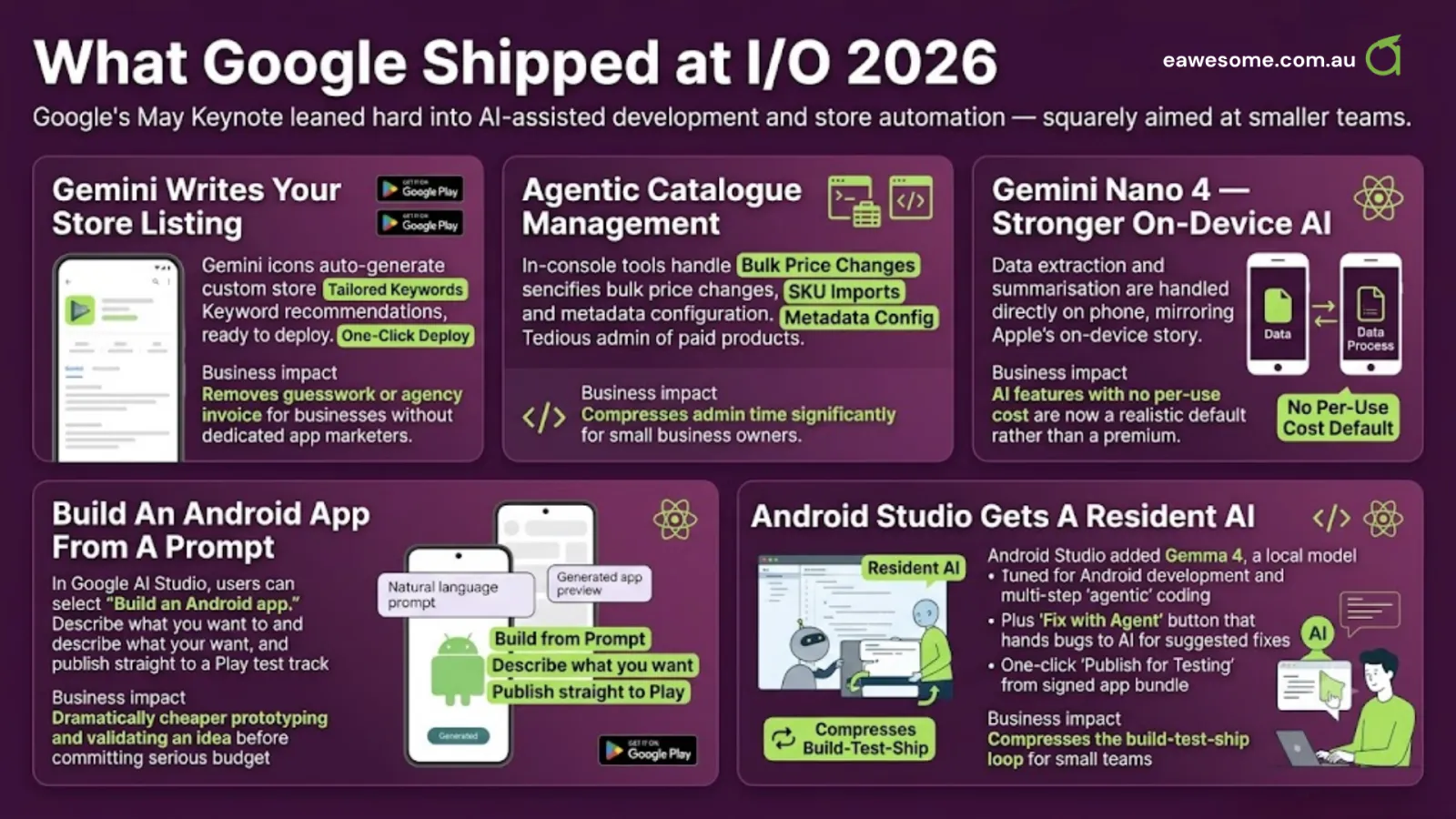
Gemini writes your store listing. Google Play can now auto-generate custom store listings tailored to keyword recommendations, ready to deploy in one click. For a business without a dedicated app marketer, that removes a task that used to mean guesswork or an agency invoice.
Agentic catalogue management. New in-console tools handle bulk price changes, SKU imports, and metadata configuration — the tedious admin of running paid products — in a fraction of the time.
Gemini Nano 4 — stronger on-device AI. Google’s new on-device model handles data extraction and summarisation directly on the phone, mirroring Apple’s on-device story. Between the two platforms, “AI features with no per-use cost” is now a realistic default rather than a premium.
Build an Android app from a prompt. In Google AI Studio you can now select “Build an Android app,” describe what you want, and publish the result straight to a Play test track. It will not replace a real build for a serious product, but it makes prototyping and validating an idea dramatically cheaper before you commit budget.
Android Studio gets a resident AI. Android Studio added Gemma 4, a local model tuned for Android development and multi-step “agentic” coding, plus a “Fix with Agent” button that hands bugs and memory leaks to AI for suggested fixes, and one-click “Publish for Testing” from a signed app bundle. All of it compresses the build-test-ship loop.
The theme that ties it together: doing more with a smaller budget
Step back from the feature lists and a pattern emerges. In 2026, both Apple and Google spent their keynotes lowering the cost of the things that used to make apps expensive for small businesses:
- AI features that previously meant an ongoing cloud bill now run on-device or on a free tier.
- Building the app is faster because AI now handles a chunk of the repetitive coding and testing.
- Listing, pricing, and shipping — the operational tax on every app — got automated.
If you priced an app in 2024 or 2025 and the quote scared you off, it is genuinely worth re-pricing in 2026. The capability-per-dollar has moved. Our Australian app cost breakdown is a good starting point for expectations, and if you are weighing your build approach, the cross-platform versus native comparison and our Flutter vs React Native guide will help you frame the conversation before you talk to a developer.
Where the honesty matters
Platform announcements always sound better in a keynote than they play out in a real project. A few caveats worth holding onto:
- On-device AI is smaller AI. The models that run on a phone — Apple’s Foundation Models, Gemini Nano 4 — are capable but not as powerful as the big cloud models. They are excellent for summarising, categorising, and simple generation; less so for deep reasoning. Match the tool to the job.
- “Build an app from a prompt” is for prototypes, not production. AI Studio scaffolding is brilliant for testing an idea cheaply. Shipping something customers rely on still needs a developer who can architect it so it does not fall over at scale. We answered “can AI just build my app?” honestly here.
- New features need new devices. On-device AI and the latest APIs assume reasonably recent phones. If your customer base runs older hardware, some of this lands next year, not today.
- Free AI has a ceiling. Apple’s free Foundation Models tier is generous but tied to download thresholds; heavy cloud usage still has a cost. Plan features around what each tier actually covers.
How an Australian business should actually use this in 2026
If you are planning an app this year, three practical moves:
- Prototype before you commit. Use AI Studio (or a short paid sprint) to turn your idea into something you can tap through, then decide what to fund. Validating cheaply first is the biggest budget saver available.
- Reach for on-device AI before a cloud AI subscription. If a feature can run on the phone via Foundation Models or Gemini Nano, you avoid an ongoing per-user cost and sidestep a pile of data-privacy questions — which matters under Australian privacy obligations.
- Let the platforms do the admin. Free localisation, AI-written store listings, and automated catalogue tools mean you spend less on the marketing-and-ops overhead and more on the app itself.
The through-line is simple: this year’s platform releases made ambitious apps cheaper and cautious apps easier. For an Australian SME that has been waiting for the numbers to make sense, 2026 moved them in your favour.
Frequently asked questions
Do the WWDC 2026 and Google I/O 2026 updates mean my app will be cheaper to build? In many cases, yes — modestly. The biggest savings come from AI-assisted development trimming billable hours, free on-device AI replacing paid cloud features, and automated store tools cutting admin. The core work of designing, building, and testing a quality app still takes skilled time, so treat this as a meaningful trim rather than a discount.
Is on-device AI good enough for a real business feature? For summarising text, sorting and tagging content, smart search, and lightweight generation, Apple’s Foundation Models and Google’s Gemini Nano 4 are genuinely useful and cost nothing per use. For complex reasoning or large-context tasks you will still want a cloud model. A good developer mixes the two based on what each feature needs — and in 2026 both platforms make that mix easier.
Can I really build an app just by prompting AI now? You can build a working prototype quickly with tools like Google AI Studio, which is fantastic for validating an idea before spending money. Shipping a reliable, secure, scalable product to real customers still needs professional development. Use AI to de-risk the decision, not to skip the build.
We already have an app — is it worth updating for these features? Often yes, if your users are on recent devices. Free on-device AI, AI-generated store listings, and better re-engagement tools can add value to an existing app without a rebuild. Start with a short review of which 2026 updates map to features your users actually want.
Your app needs a secure, low-latency backend to match these front-end gains. Cloud Geeks builds and manages the cloud infrastructure and APIs that Australian mobile apps run on.
For the strategy layer — how AI and platform shifts reshape what your business should build next — Ash Ganda writes on digital transformation for Australian SMEs.
Awesome Apps is part of the Ganda Tech Services family, building iOS, Android, and cross-platform apps for Australian businesses.
Talk to a Sydney app developer — free.
30 minutes. We'll tell you what your app needs, how long it takes, and what it costs. Real answers, no sales pitch.
Book Free App Strategy Call →Free · 30 minutes · No obligation