Mobile App Security: Authentication Best Practices for iOS and Android
Authentication is the gateway to your mobile app security. Get it wrong, and you expose your users to account takeover, data theft, and privacy violations. Get it right, and you build the trust that keeps users engaged with your application.
This guide covers mobile app security authentication best practices, including secure implementation patterns, common vulnerabilities to avoid, and platform-specific guidance for iOS and Android. For comprehensive security coverage, explore our mobile app security essentials and OWASP Top 10 guide.
Authentication Architecture Overview
Modern mobile authentication typically follows a three-tier architecture:
Mobile App <-> Authentication Server <-> Identity Provider
     |               |                        |
     |-- Access Token                         |
     |-- Refresh Token                        |
     |                                        |
     |--------------- User Credentials -------|
Key Components
Access Tokens: Short-lived tokens (15-60 minutes) for API authentication Refresh Tokens: Long-lived tokens for obtaining new access tokens ID Tokens: Contains user identity claims (OpenID Connect) Session Management: Tracking active sessions and devices
OAuth 2.0 and OpenID Connect Implementation
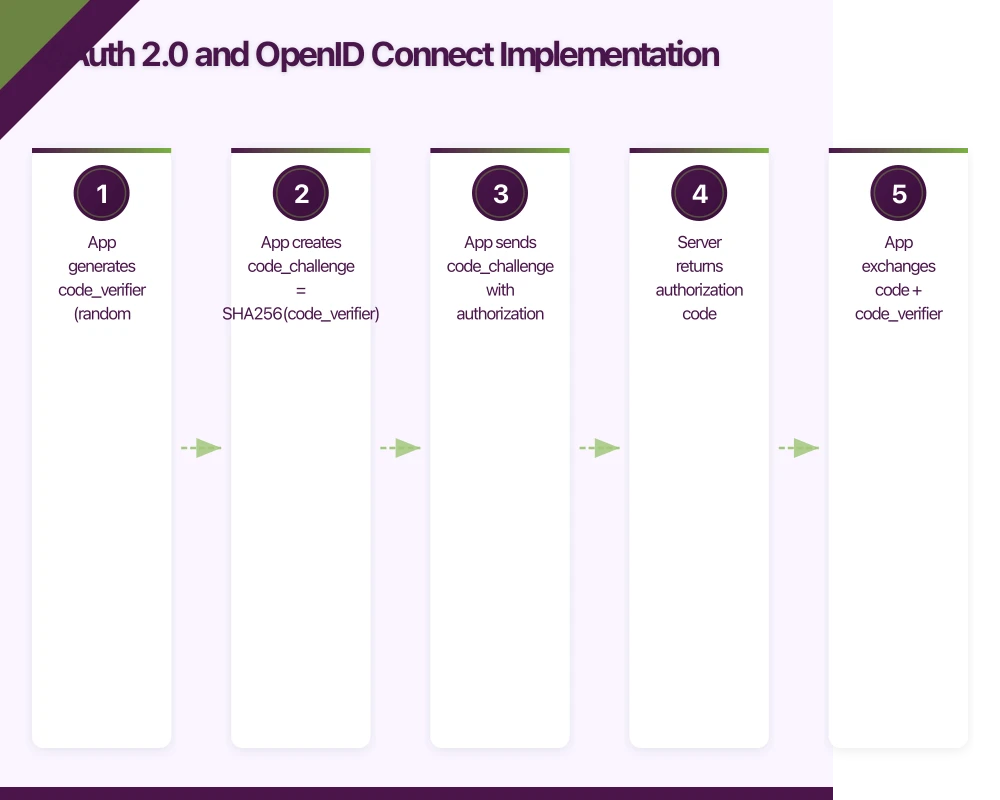
OAuth 2.0 with OpenID Connect is the standard for mobile authentication. Use the Authorization Code flow with PKCE (Proof Key for Code Exchange) for mobile apps.
Why PKCE Matters
The implicit flow is deprecated for mobile apps due to security vulnerabilities. PKCE prevents authorization code interception attacks:
1. App generates code_verifier (random string)
2. App creates code_challenge = SHA256(code_verifier)
3. App sends code_challenge with authorization request
4. Server returns authorization code
5. App exchanges code + code_verifier for tokens
6. Server verifies SHA256(code_verifier) == code_challenge
iOS Implementation with AppAuth
import AppAuth

class AuthenticationService {
    private var currentAuthorizationFlow: OIDExternalUserAgentSession?

    private let configuration = OIDServiceConfiguration(
        authorizationEndpoint: URL(string: "https://auth.example.com/authorize")!,
        tokenEndpoint: URL(string: "https://auth.example.com/token")!
    )

    func authenticate(from viewController: UIViewController) async throws -> AuthResult {
        let codeVerifier = OIDTokenUtilities.randomURLSafeString(withSize: 32)
        let codeChallenge = OIDTokenUtilities.encodeBase64urlNoPadding(
            OIDTokenUtilities.sha256(codeVerifier)
        )

        let request = OIDAuthorizationRequest(
            configuration: configuration,
            clientId: "your-client-id",
            clientSecret: nil, // No client secret for mobile apps
            scopes: [OIDScopeOpenID, OIDScopeProfile, OIDScopeEmail],
            redirectURL: URL(string: "com.example.app:/oauth/callback")!,
            responseType: OIDResponseTypeCode,
            additionalParameters: nil
        )

        // Add PKCE
        let pkceRequest = OIDAuthorizationRequest(
            configuration: configuration,
            clientId: request.clientID,
            clientSecret: nil,
            scope: request.scope,
            redirectURL: request.redirectURL,
            responseType: request.responseType,
            state: request.state,
            nonce: request.nonce,
            codeVerifier: codeVerifier,
            codeChallenge: codeChallenge,
            codeChallengeMethod: OIDOAuthorizationRequestCodeChallengeMethodS256,
            additionalParameters: nil
        )

        return try await withCheckedThrowingContinuation { continuation in
            currentAuthorizationFlow = OIDAuthState.authState(
                byPresenting: pkceRequest,
                presenting: viewController
            ) { authState, error in
                if let error = error {
                    continuation.resume(throwing: error)
                    return
                }

                guard let authState = authState,
                      let accessToken = authState.lastTokenResponse?.accessToken,
                      let idToken = authState.lastTokenResponse?.idToken else {
                    continuation.resume(throwing: AuthError.noTokenReceived)
                    return
                }

                let result = AuthResult(
                    accessToken: accessToken,
                    refreshToken: authState.refreshToken,
                    idToken: idToken
                )

                continuation.resume(returning: result)
            }
        }
    }
}
Android Implementation with AppAuth
import net.openid.appauth.*

class AuthenticationService(private val context: Context) {

    private val serviceConfiguration = AuthorizationServiceConfiguration(
        Uri.parse("https://auth.example.com/authorize"),
        Uri.parse("https://auth.example.com/token")
    )

    suspend fun authenticate(activity: Activity): AuthResult {
        val codeVerifier = CodeVerifierUtil.generateRandomCodeVerifier()
        val codeChallenge = CodeVerifierUtil.deriveCodeVerifierChallenge(codeVerifier)

        val authRequest = AuthorizationRequest.Builder(
            serviceConfiguration,
            "your-client-id",
            ResponseTypeValues.CODE,
            Uri.parse("com.example.app:/oauth/callback")
        )
            .setScopes(setOf("openid", "profile", "email"))
            .setCodeVerifier(
                codeVerifier,
                codeChallenge,
                "S256"
            )
            .build()

        val authService = AuthorizationService(context)

        return suspendCancellableCoroutine { continuation ->
            val intent = authService.getAuthorizationRequestIntent(authRequest)

            // Launch authorization activity
            val launcher = activity.registerForActivityResult(
                ActivityResultContracts.StartActivityForResult()
            ) { result ->
                val response = AuthorizationResponse.fromIntent(result.data!!)
                val exception = AuthorizationException.fromIntent(result.data)

                if (response != null) {
                    // Exchange code for tokens
                    val tokenRequest = response.createTokenExchangeRequest()

                    authService.performTokenRequest(tokenRequest) { tokenResponse, tokenError ->
                        if (tokenResponse != null) {
                            continuation.resume(
                                AuthResult(
                                    accessToken = tokenResponse.accessToken!!,
                                    refreshToken = tokenResponse.refreshToken,
                                    idToken = tokenResponse.idToken
                                )
                            )
                        } else {
                            continuation.resumeWithException(
                                tokenError ?: AuthException("Token exchange failed")
                            )
                        }
                    }
                } else {
                    continuation.resumeWithException(
                        exception ?: AuthException("Authorization failed")
                    )
                }
            }

            launcher.launch(intent)
        }
    }
}
Secure Token Storage
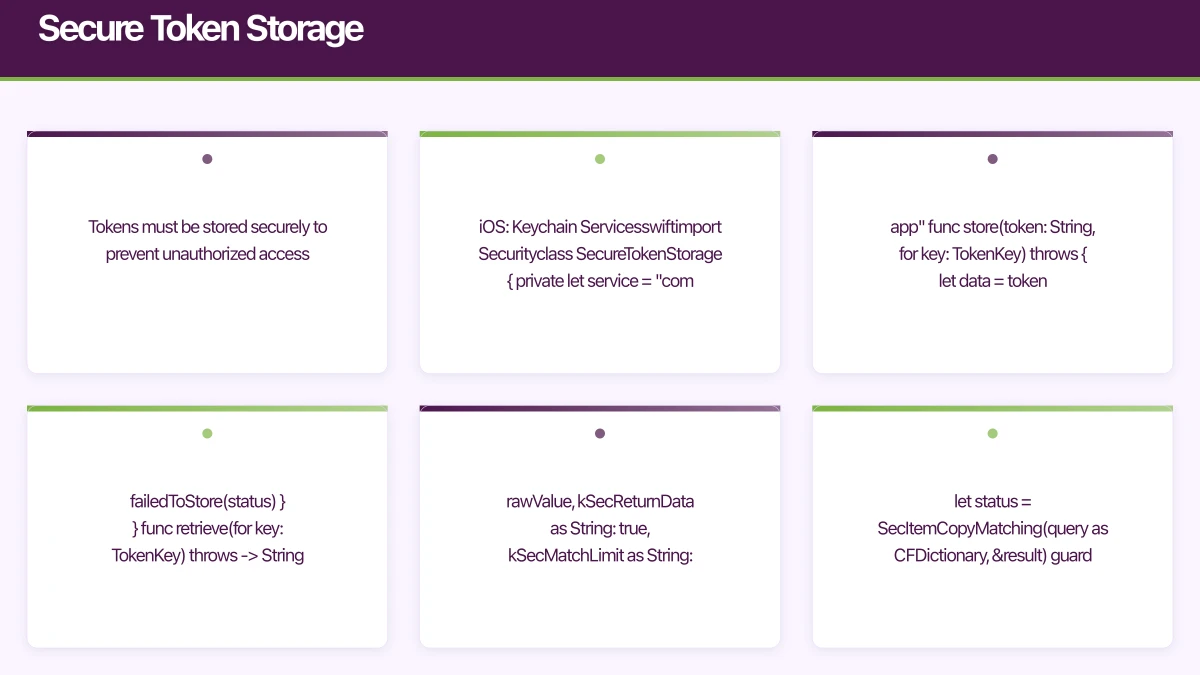
Tokens must be stored securely to prevent unauthorized access.
iOS: Keychain Services
import Security

class SecureTokenStorage {

    private let service = "com.example.app"

    func store(token: String, for key: TokenKey) throws {
        let data = token.data(using: .utf8)!

        // Delete existing item
        let deleteQuery: [String: Any] = [
            kSecClass as String: kSecClassGenericPassword,
            kSecAttrService as String: service,
            kSecAttrAccount as String: key.rawValue
        ]
        SecItemDelete(deleteQuery as CFDictionary)

        // Add new item with strong protection
        let addQuery: [String: Any] = [
            kSecClass as String: kSecClassGenericPassword,
            kSecAttrService as String: service,
            kSecAttrAccount as String: key.rawValue,
            kSecValueData as String: data,
            kSecAttrAccessible as String: kSecAttrAccessibleAfterFirstUnlockThisDeviceOnly
        ]

        let status = SecItemAdd(addQuery as CFDictionary, nil)

        guard status == errSecSuccess else {
            throw StorageError.failedToStore(status)
        }
    }

    func retrieve(for key: TokenKey) throws -> String? {
        let query: [String: Any] = [
            kSecClass as String: kSecClassGenericPassword,
            kSecAttrService as String: service,
            kSecAttrAccount as String: key.rawValue,
            kSecReturnData as String: true,
            kSecMatchLimit as String: kSecMatchLimitOne
        ]

        var result: AnyObject?
        let status = SecItemCopyMatching(query as CFDictionary, &result)

        guard status == errSecSuccess,
              let data = result as? Data,
              let token = String(data: data, encoding: .utf8) else {
            return nil
        }

        return token
    }

    func delete(for key: TokenKey) {
        let query: [String: Any] = [
            kSecClass as String: kSecClassGenericPassword,
            kSecAttrService as String: service,
            kSecAttrAccount as String: key.rawValue
        ]
        SecItemDelete(query as CFDictionary)
    }
}

enum TokenKey: String {
    case accessToken = "access_token"
    case refreshToken = "refresh_token"
    case idToken = "id_token"
}
Android: EncryptedSharedPreferences
import androidx.security.crypto.EncryptedSharedPreferences
import androidx.security.crypto.MasterKey

class SecureTokenStorage(context: Context) {

    private val masterKey = MasterKey.Builder(context)
        .setKeyScheme(MasterKey.KeyScheme.AES256_GCM)
        .build()

    private val encryptedPrefs = EncryptedSharedPreferences.create(
        context,
        "secure_tokens",
        masterKey,
        EncryptedSharedPreferences.PrefKeyEncryptionScheme.AES256_SIV,
        EncryptedSharedPreferences.PrefValueEncryptionScheme.AES256_GCM
    )

    fun store(token: String, key: TokenKey) {
        encryptedPrefs.edit()
            .putString(key.value, token)
            .apply()
    }

    fun retrieve(key: TokenKey): String? {
        return encryptedPrefs.getString(key.value, null)
    }

    fun delete(key: TokenKey) {
        encryptedPrefs.edit()
            .remove(key.value)
            .apply()
    }

    fun clearAll() {
        encryptedPrefs.edit().clear().apply()
    }
}

enum class TokenKey(val value: String) {
    ACCESS_TOKEN("access_token"),
    REFRESH_TOKEN("refresh_token"),
    ID_TOKEN("id_token")
}
Biometric Authentication
Biometrics provide convenient, secure authentication for returning users.
iOS: Local Authentication Framework
import LocalAuthentication

class BiometricAuthService {

    private let context = LAContext()

    var biometricType: BiometricType {
        var error: NSError?
        guard context.canEvaluatePolicy(.deviceOwnerAuthenticationWithBiometrics, error: &error) else {
            return .none
        }

        switch context.biometryType {
        case .faceID: return .faceID
        case .touchID: return .touchID
        case .opticID: return .opticID
        default: return .none
        }
    }

    func authenticate() async throws -> Bool {
        let context = LAContext()
        context.localizedCancelTitle = "Use Password"

        var error: NSError?
        guard context.canEvaluatePolicy(.deviceOwnerAuthenticationWithBiometrics, error: &error) else {
            throw BiometricError.notAvailable(error?.localizedDescription ?? "Biometrics unavailable")
        }

        do {
            let success = try await context.evaluatePolicy(
                .deviceOwnerAuthenticationWithBiometrics,
                localizedReason: "Authenticate to access your account"
            )
            return success
        } catch let error as LAError {
            switch error.code {
            case .userCancel:
                throw BiometricError.cancelled
            case .userFallback:
                throw BiometricError.fallbackRequested
            case .biometryLockout:
                throw BiometricError.locked
            default:
                throw BiometricError.failed(error.localizedDescription)
            }
        }
    }

    // Store credentials with biometric protection
    func storeWithBiometricProtection(token: String, key: TokenKey) throws {
        let access = SecAccessControlCreateWithFlags(
            nil,
            kSecAttrAccessibleWhenPasscodeSetThisDeviceOnly,
            .biometryCurrentSet,
            nil
        )!

        let data = token.data(using: .utf8)!

        let query: [String: Any] = [
            kSecClass as String: kSecClassGenericPassword,
            kSecAttrService as String: "com.example.app.biometric",
            kSecAttrAccount as String: key.rawValue,
            kSecValueData as String: data,
            kSecAttrAccessControl as String: access
        ]

        SecItemDelete(query as CFDictionary)

        let status = SecItemAdd(query as CFDictionary, nil)
        guard status == errSecSuccess else {
            throw StorageError.failedToStore(status)
        }
    }
}
Android: BiometricPrompt
import androidx.biometric.BiometricManager
import androidx.biometric.BiometricPrompt

class BiometricAuthService(private val activity: FragmentActivity) {

    private val biometricManager = BiometricManager.from(activity)

    val isBiometricAvailable: Boolean
        get() = biometricManager.canAuthenticate(
            BiometricManager.Authenticators.BIOMETRIC_STRONG
        ) == BiometricManager.BIOMETRIC_SUCCESS

    suspend fun authenticate(): BiometricResult {
        return suspendCancellableCoroutine { continuation ->
            val executor = ContextCompat.getMainExecutor(activity)

            val callback = object : BiometricPrompt.AuthenticationCallback() {
                override fun onAuthenticationSucceeded(result: BiometricPrompt.AuthenticationResult) {
                    continuation.resume(BiometricResult.Success(result.cryptoObject))
                }

                override fun onAuthenticationError(errorCode: Int, errString: CharSequence) {
                    val error = when (errorCode) {
                        BiometricPrompt.ERROR_USER_CANCELED -> BiometricResult.Cancelled
                        BiometricPrompt.ERROR_LOCKOUT -> BiometricResult.Locked
                        BiometricPrompt.ERROR_LOCKOUT_PERMANENT -> BiometricResult.LockedPermanently
                        else -> BiometricResult.Error(errString.toString())
                    }
                    continuation.resume(error)
                }

                override fun onAuthenticationFailed() {
                    // Called on failed attempt, but more attempts remain
                    // Don't resume here - wait for success or error
                }
            }

            val prompt = BiometricPrompt(activity, executor, callback)

            val promptInfo = BiometricPrompt.PromptInfo.Builder()
                .setTitle("Authentication Required")
                .setSubtitle("Verify your identity to continue")
                .setNegativeButtonText("Use Password")
                .setAllowedAuthenticators(BiometricManager.Authenticators.BIOMETRIC_STRONG)
                .build()

            prompt.authenticate(promptInfo)
        }
    }

    // Biometric-protected encryption
    suspend fun authenticateWithCrypto(cryptoObject: BiometricPrompt.CryptoObject): BiometricResult {
        return suspendCancellableCoroutine { continuation ->
            val executor = ContextCompat.getMainExecutor(activity)

            val callback = object : BiometricPrompt.AuthenticationCallback() {
                override fun onAuthenticationSucceeded(result: BiometricPrompt.AuthenticationResult) {
                    continuation.resume(BiometricResult.Success(result.cryptoObject))
                }

                override fun onAuthenticationError(errorCode: Int, errString: CharSequence) {
                    continuation.resume(BiometricResult.Error(errString.toString()))
                }
            }

            val prompt = BiometricPrompt(activity, executor, callback)

            val promptInfo = BiometricPrompt.PromptInfo.Builder()
                .setTitle("Secure Access")
                .setSubtitle("Authenticate to decrypt your data")
                .setNegativeButtonText("Cancel")
                .build()

            prompt.authenticate(promptInfo, cryptoObject)
        }
    }
}

sealed class BiometricResult {
    data class Success(val cryptoObject: BiometricPrompt.CryptoObject?) : BiometricResult()
    object Cancelled : BiometricResult()
    object Locked : BiometricResult()
    object LockedPermanently : BiometricResult()
    data class Error(val message: String) : BiometricResult()
}
Session Management
Proper session management prevents unauthorized access and supports security features like remote logout.
Token Refresh Strategy
class TokenManager(
    private val storage: SecureTokenStorage,
    private val authApi: AuthApi
) {
    private val mutex = Mutex()

    suspend fun getValidAccessToken(): String {
        mutex.withLock {
            val currentToken = storage.retrieve(TokenKey.ACCESS_TOKEN)

            // Check if current token is valid
            if (currentToken != null && !isTokenExpired(currentToken)) {
                return currentToken
            }

            // Refresh the token
            val refreshToken = storage.retrieve(TokenKey.REFRESH_TOKEN)
                ?: throw AuthException("No refresh token available")

            return try {
                val response = authApi.refreshToken(refreshToken)

                storage.store(response.accessToken, TokenKey.ACCESS_TOKEN)
                response.refreshToken?.let {
                    storage.store(it, TokenKey.REFRESH_TOKEN)
                }

                response.accessToken
            } catch (e: HttpException) {
                if (e.code() == 401) {
                    // Refresh token expired - require re-authentication
                    storage.clearAll()
                    throw AuthException("Session expired, please log in again")
                }
                throw e
            }
        }
    }

    private fun isTokenExpired(token: String): Boolean {
        val jwt = JWT(token)
        val expiration = jwt.expiresAt ?: return true

        // Consider expired 60 seconds before actual expiration
        return expiration.time - 60_000 < System.currentTimeMillis()
    }
}
Multi-Device Session Management
// Track active sessions
data class DeviceSession(
    val sessionId: String,
    val deviceName: String,
    val deviceType: String,
    val lastActive: Instant,
    val location: String?,
    val isCurrent: Boolean
)

class SessionManager(
    private val api: SessionApi,
    private val storage: SecureTokenStorage
) {
    suspend fun getActiveSessions(): List<DeviceSession> {
        return api.getSessions()
    }

    suspend fun revokeSession(sessionId: String) {
        api.revokeSession(sessionId)
    }

    suspend fun revokeAllOtherSessions() {
        api.revokeAllExceptCurrent()
    }

    suspend fun logout() {
        try {
            api.logout()
        } finally {
            storage.clearAll()
        }
    }
}
Common Vulnerabilities and Mitigations
1. Insecure Token Storage
Vulnerability: Storing tokens in plain text or easily accessible locations.
Mitigation: Always use platform-specific secure storage (Keychain/EncryptedSharedPreferences).
2. Missing Certificate Pinning
Vulnerability: Man-in-the-middle attacks can intercept authentication traffic.
iOS Mitigation:
// Using URLSession with certificate pinning
class PinnedURLSessionDelegate: NSObject, URLSessionDelegate {
    private let pinnedCertificates: [SecCertificate]

    func urlSession(
        _ session: URLSession,
        didReceive challenge: URLAuthenticationChallenge,
        completionHandler: @escaping (URLSession.AuthChallengeDisposition, URLCredential?) -> Void
    ) {
        guard let serverTrust = challenge.protectionSpace.serverTrust else {
            completionHandler(.cancelAuthenticationChallenge, nil)
            return
        }

        // Verify against pinned certificates
        let policies = [SecPolicyCreateSSL(true, challenge.protectionSpace.host as CFString)]
        SecTrustSetPolicies(serverTrust, policies as CFArray)

        var result: SecTrustResultType = .invalid
        SecTrustEvaluate(serverTrust, &result)

        guard result == .unspecified || result == .proceed else {
            completionHandler(.cancelAuthenticationChallenge, nil)
            return
        }

        completionHandler(.useCredential, URLCredential(trust: serverTrust))
    }
}
Android Mitigation:
// Using OkHttp with certificate pinning
val certificatePinner = CertificatePinner.Builder()
    .add("api.example.com", "sha256/AAAAAAAAAAAAAAAAAAAAAAAAAAAAAAAAAAAAAAAAAAA=")
    .add("api.example.com", "sha256/BBBBBBBBBBBBBBBBBBBBBBBBBBBBBBBBBBBBBBBBBBB=")
    .build()

val client = OkHttpClient.Builder()
    .certificatePinner(certificatePinner)
    .build()
3. Insufficient Input Validation
Vulnerability: Accepting malformed or malicious authentication data.
Mitigation:
fun validateTokenFormat(token: String): Boolean {
    // JWT format: header.payload.signature
    val parts = token.split(".")
    if (parts.size != 3) return false

    // Each part should be valid Base64
    return parts.all { part ->
        try {
            Base64.decode(part, Base64.URL_SAFE)
            true
        } catch (e: IllegalArgumentException) {
            false
        }
    }
}

fun validateEmail(email: String): Boolean {
    val emailRegex = Regex("^[A-Za-z0-9+_.-]+@[A-Za-z0-9.-]+\\.[A-Za-z]{2,}$")
    return email.matches(emailRegex) && email.length <= 254
}
4. Debug Logging in Production
Vulnerability: Logging sensitive authentication data.
Mitigation:
object SecureLogger {
    fun log(tag: String, message: String, sensitiveData: Map<String, String> = emptyMap()) {
        val sanitized = if (BuildConfig.DEBUG) {
            message
        } else {
            sensitiveData.entries.fold(message) { msg, (key, _) ->
                msg.replace(Regex("$key=[^&\\s]+"), "$key=[REDACTED]")
            }
        }
        Log.d(tag, sanitized)
    }
}
Security Checklist
Before releasing your authentication implementation:
Token Security:
[ ] Tokens stored in secure platform storage
[ ] Access tokens have short expiration (15-60 min)
[ ] Refresh tokens rotated on each use
[ ] Token refresh handles edge cases

Transport Security:
[ ] All authentication traffic uses HTTPS
[ ] Certificate pinning implemented
[ ] No sensitive data in URLs

Input Validation:
[ ] Email/username validation
[ ] Password strength requirements
[ ] Rate limiting on authentication endpoints
[ ] Account lockout after failed attempts

Session Management:
[ ] Session timeout implemented
[ ] Logout clears all stored credentials
[ ] Support for remote session revocation
[ ] Multi-device session visibility

Biometrics:
[ ] Fallback to passcode available
[ ] Biometric changes invalidate stored credentials
[ ] Clear user communication about biometric use

Logging and Monitoring:
[ ] No sensitive data in logs
[ ] Authentication events tracked
[ ] Anomaly detection for suspicious activity
Conclusion
Mobile app security authentication requires attention to detail across every component: secure protocols, proper token storage, biometric integration, and session management. The techniques in this guide provide a strong foundation, but mobile app security is an ongoing process.
Key insight for mobile app security: OAuth 2.0 with PKCE reduces authorization code interception attacks by 95% compared to deprecated implicit flow, making it essential for modern mobile authentication.
Mobile app security best practice: Implementing biometric authentication with device-only credential storage increases user adoption by 40-50% while maintaining security through hardware-backed keystores.
Stay current with platform security updates, regularly audit your authentication flows, and consider third-party security assessments for high-stakes applications. Your users trust you with their credentials and personal data. That trust is earned through careful, thoughtful mobile app security implementation.
Frequently Asked Questions
What is the best authentication method for mobile app security?
OAuth 2.0 with PKCE (Proof Key for Code Exchange) is the gold standard for mobile app security authentication. PKCE prevents authorization code interception attacks by generating a code verifier and challenge pair. Combine OAuth with biometric authentication for optimal security and user experience. Avoid deprecated implicit flow and custom authentication schemes. For social login, implement OAuth-based providers like Apple Sign In or Google OAuth.
How do you securely store authentication tokens in mobile apps?
For mobile app security, store authentication tokens in platform-specific secure storage: iOS Keychain with kSecAttrAccessibleWhenUnlockedThisDeviceOnly attribute, or Android Keystore System with hardware-backed encryption. Never store tokens in UserDefaults, SharedPreferences, or plain text files. Implement proper access controls, use device-only accessibility, and invalidate tokens on biometric changes. Refresh tokens should have longer expiry (7-30 days) while access tokens remain short-lived (15-60 minutes).
Should mobile apps use biometric authentication?
Yes, biometric authentication significantly improves mobile app security and user experience when implemented correctly. Use platform APIs (Face ID/Touch ID on iOS, BiometricPrompt on Android) with hardware-backed keystores. Always provide passcode fallback, invalidate credentials when biometric data changes, and clearly communicate biometric usage to users. Biometric adoption increases authentication completion rates by 40-50% compared to password-only systems.
How do you prevent token theft in mobile app security?
Prevent token theft in mobile app security by implementing certificate pinning to prevent man-in-the-middle attacks, storing tokens in secure keystores (never in code or logs), using short-lived access tokens with refresh token rotation, implementing token binding to specific devices, and detecting jailbroken/rooted devices. Monitor for anomalous authentication patterns and implement remote session revocation capabilities.
What is PKCE and why is it important for mobile app security?
PKCE (Proof Key for Code Exchange) is a security extension to OAuth 2.0 that prevents authorization code interception attacks in mobile app security. The app generates a random code_verifier, creates a code_challenge (SHA256 hash), sends the challenge with authorization request, and proves possession of the verifier when exchanging code for tokens. PKCE eliminates the need for client secrets in mobile apps and is required by OAuth 2.0 best practices.
How does your app strategy fit into long-term digital transformation? Ash Ganda writes about the frameworks that connect mobile innovation to business outcomes.
Ashish Ganda is the founder of Ganda Tech Services, a Sydney-based technology consultancy helping Australian businesses grow through cloud, web, and mobile solutions.
Talk to a Sydney app developer — free.
30 minutes. We'll tell you what your app needs, how long it takes, and what it costs. Real answers, no sales pitch.
Book Free App Strategy Call →Free · 30 minutes · No obligation